¶ General Information
¶ Communication Methods
The Time Slot Control interface offers two separate communication and use methods:
- OData v4
- Custom REST endpoints
¶ OData v4
Primary interface for integration with enterprise resource planning (ERP) and data exchange. The
OData protocol specifications are backed by ERP market leaders (Microsoft, SAP, CA Technologies, Citrix Systems, IBM, Red Hat, and others) and has native support in nearly all of their products.
¶ References
https://en.wikipedia.org/wiki/Open_Data_Protocol
https://www.odata.org/
¶ Custom REST Endpoints
Specific interface for checking license plates with cameras supporting license plate recognition (LPR) technology, reservation workflow status changes (carrier arrival, handling begun, handling completed, etc.)
¶ TSC Environments:
The TSC application offers two web application and API environments:
- Production
- Development (sandbox)
¶ Production
https://api.timeslotcontrol.com
¶ Development (sandbox)
The sandbox environment is not generated automatically when the production environment is made. Environment contains a full copy of the production environment at any given time. This environment is suited for developing integrations or functions without impacting the live production environment. Email and SMS notifications are deactivated in the development environment in order to avoid seeding confusion among end users. A new copy of the current production environment can be created at any time to run simulations on current use scenarios.
¶ Authentication
¶ Supported Authentication Methods
- Basic authentication
- JSON web token (JWT)
Both methods require creation of a dedicated API user account. All communication between the client and the API must take place via HTTPS protocol.
¶ Creating An API Account
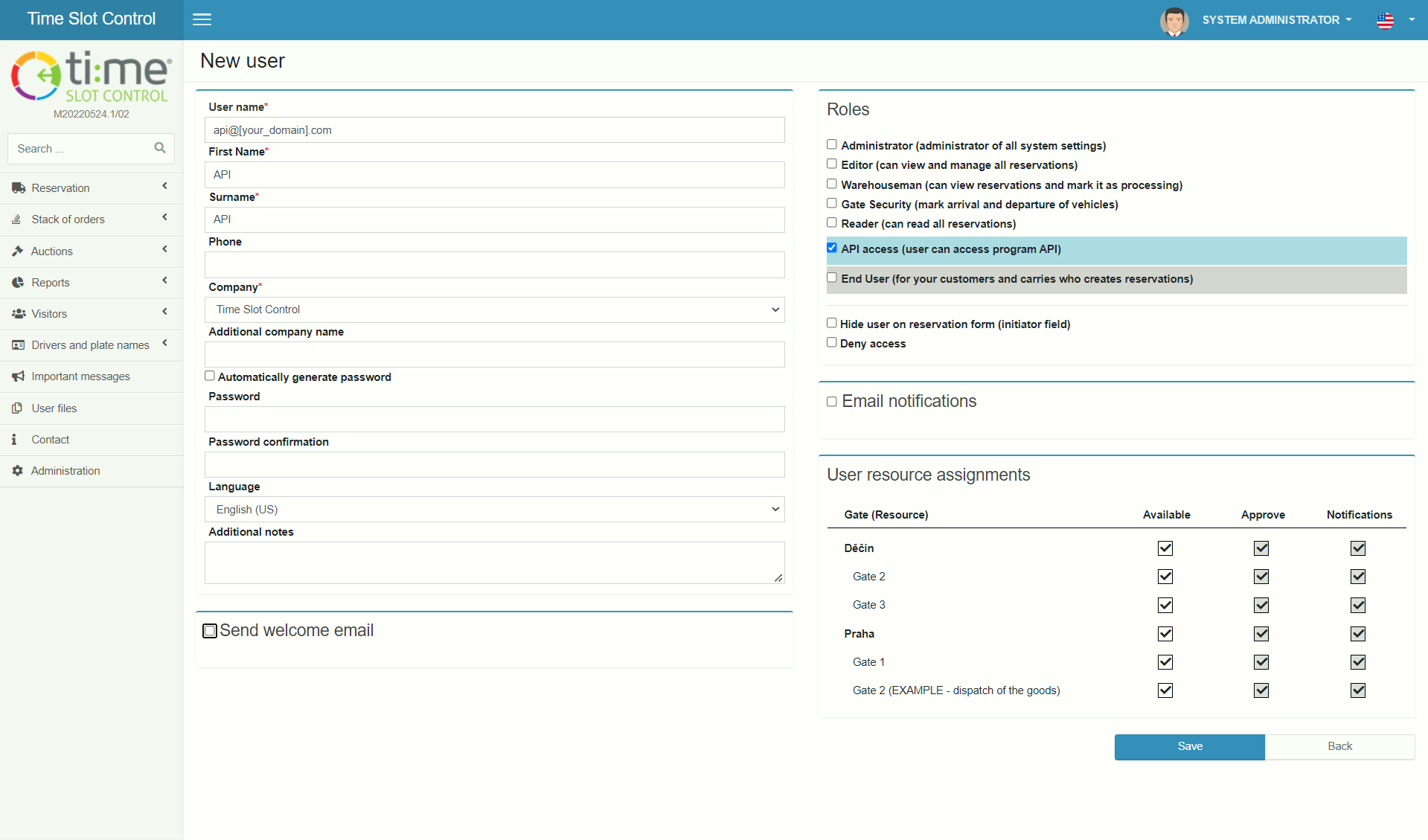
- Go to Administration
- New user
- Enter a username for the new API account (e.g., api@[your_domain].com)
- Fill in any value for First name and Last name (e.g., API)
- Choose your company
- Uncheck “Generate password automatically” and enter a password to use for communication with OData services
- Uncheck “Send welcome email”
- In the “User role” section choose the role “API access”
- Uncheck “Email notification”
- Save the new user
¶ Generating A JWT
To communicate with the API, first get a Bearer Token (JWT) using the function https://api.timeslotcontrol.com/v3/{tenant}/Token where {tenant} is the customer name displayed in the URL for TSC, e.g., https://lotraco.timeslotcontrol.com (the third level domain).
Example of command line call with JSON query:
curl -X POST "https://api.tscsandbox.com/v3/{tenant}/Token" -H "accept:application/json" -H "Content-Type:application/json;odata.metadata=minimal;odata.streaming=true" -d "{"username":"user@customer.com", "password": "password"}"
If the username and password are correct, the server returns a token that can be used in further queries (a new token is not needed for each new request).
JSON response:
{
"token": "...."
}
All further HTTP calls to the API are made with the added header “Authorization: Bearer [YourToken]”.
curl -X GET "https://api.tscsandbox.com/v3/{tenant}/Ping" -H "accept: application/json" -H "Authorization: Bearer [YourToken]"
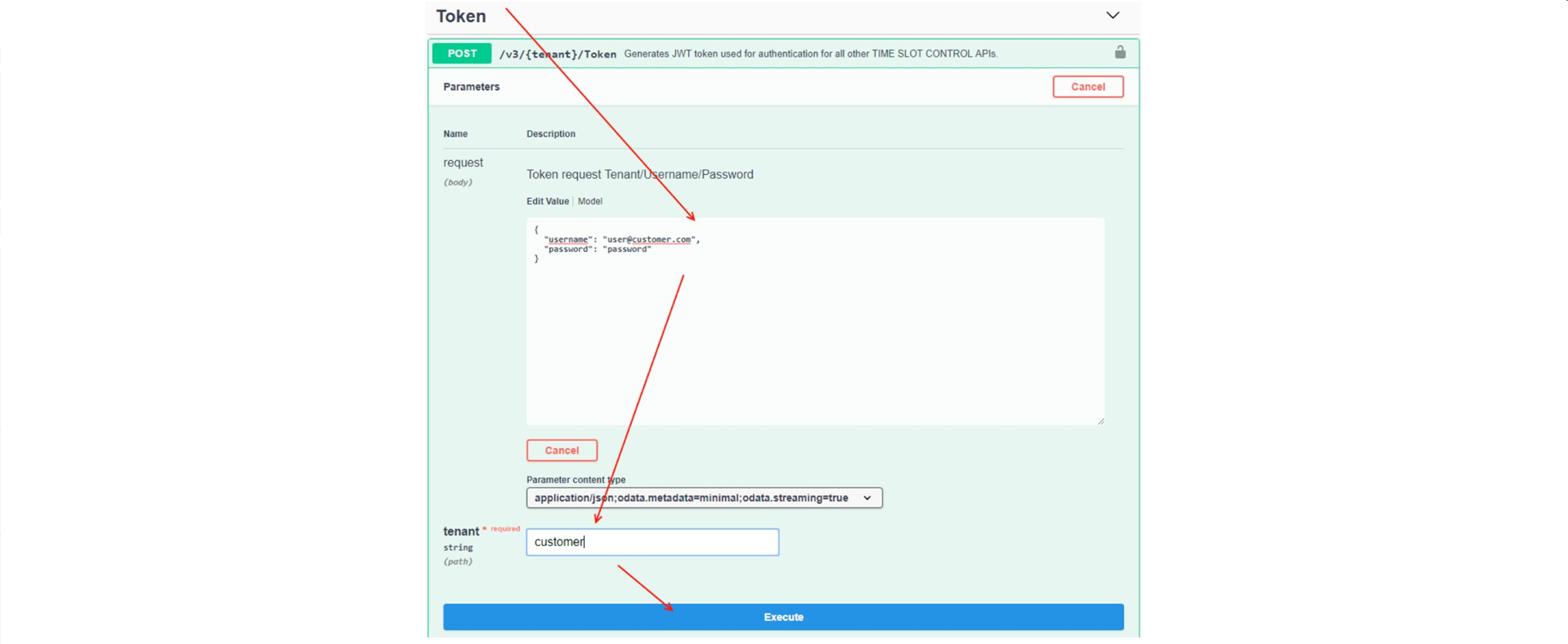
Token requests can be tested in the UI:
Then insert the resulting token in the UI through Authorize:
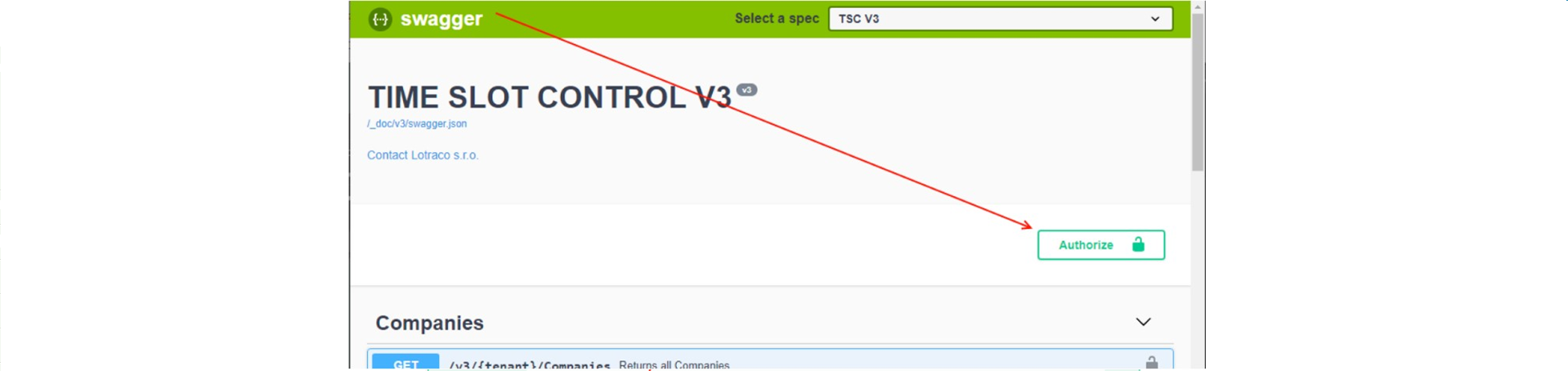
In the Bearer field enter the text from “Bearer [YourToken]” (without square brackets).

Now any API can be called from the Swagger UI.
¶ OData
¶ Integrating TSC with ERP
For integration TSC has created the Stack of orders module, where transport orders from third-party systems are replicated. The transport orders are represented on the TSC side by the objects Order and OrderRow, which define key metadata such as carrier, ordered by, recipient, customer, order number, delivery conditions, and more, including order line items, i.e., what goods are being transported. On the basis of this information the user then creates a reservation in the TSC system where 1 to n orders from the Order Bin make up one reservation for processing. Users do not have to manually re-enter anything, just place the order(s) in a basket and find a suitable time for making a reservation.
To integrate Time Slot Control with a third-party system there are three key entities available for CRUD (Create / Read / Update / Delete) in OData:
- Company – Company code
- Order – Transport order
- OrderRow – Transport order rows
Aside from the standard requests GET/POST/PUT/DELETE there are other functions implemented in the interface outside of the OData specification framework with the suffix ByIntegrationId, such as PutCompanyByIntegrationId, which updates existing records on the basis of identifiers provided by the third party, or ERP. This means ERP does not have to first send a $select query to TSC to get the primary key (Id) in the TSC system and then call the given action, but can perform the action directly using its own PK.
Supported OData query options:
- $select
- $orderby
- $top
- $skip
- $count
- $filter
Unsupported:
- $expand
HTTP methods:
- POST – Create
- PUT – Update
- PATCH – Update selected settings (not the whole object)
- DELETE – Delete
- GET – Retrieve data
The protocol specification itself describes in detail how to work with data, including examples: https://www.odata.org/getting-started/basic-tutorial/
Swagger is also available for testing and validation. See section Playground.
¶ Recommended Integration Procedure
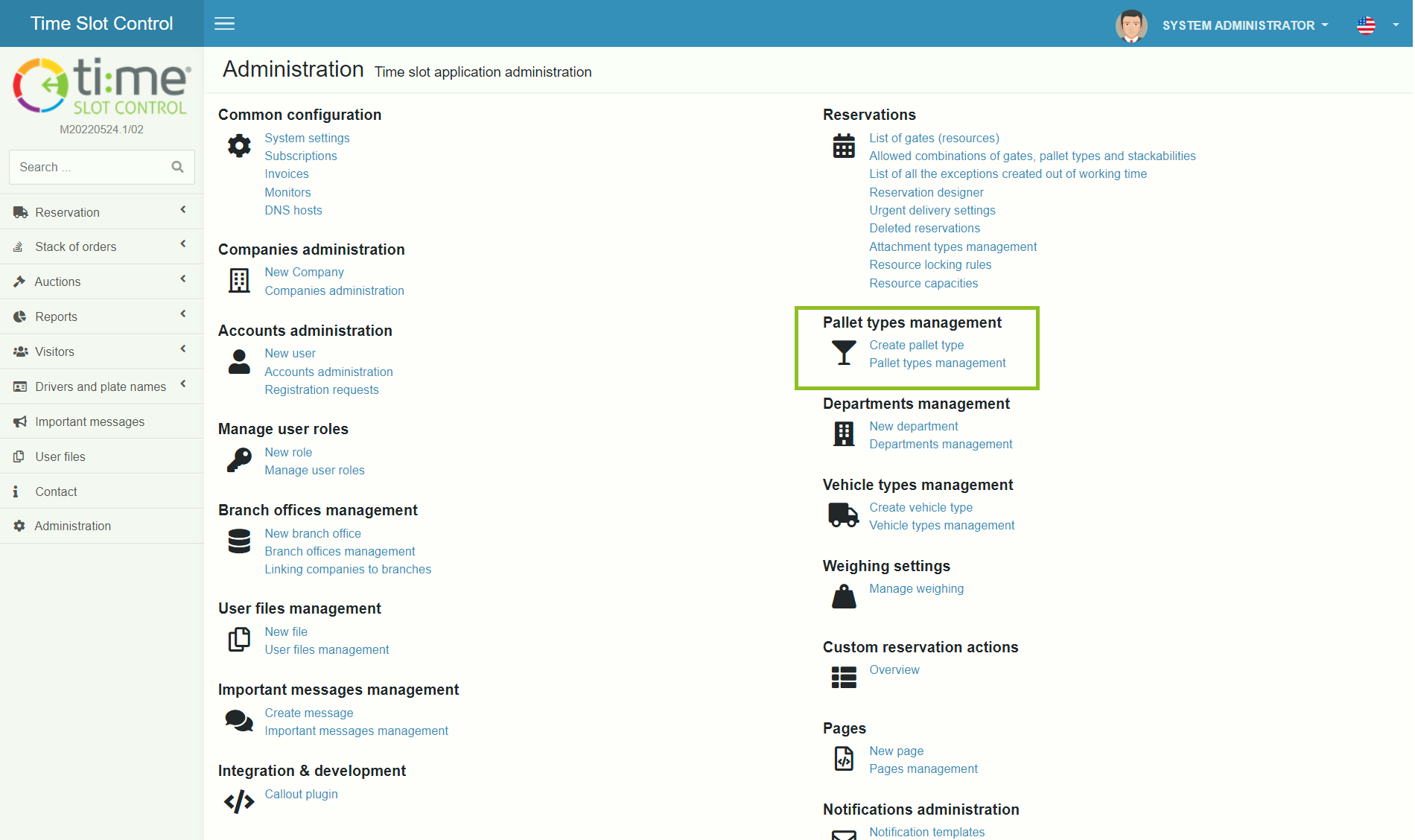
- In the TSC app, create pallet unit types per ERP and give each an ERP identifier – a shared identifier is needed for creating order rows and correctly pairing units.
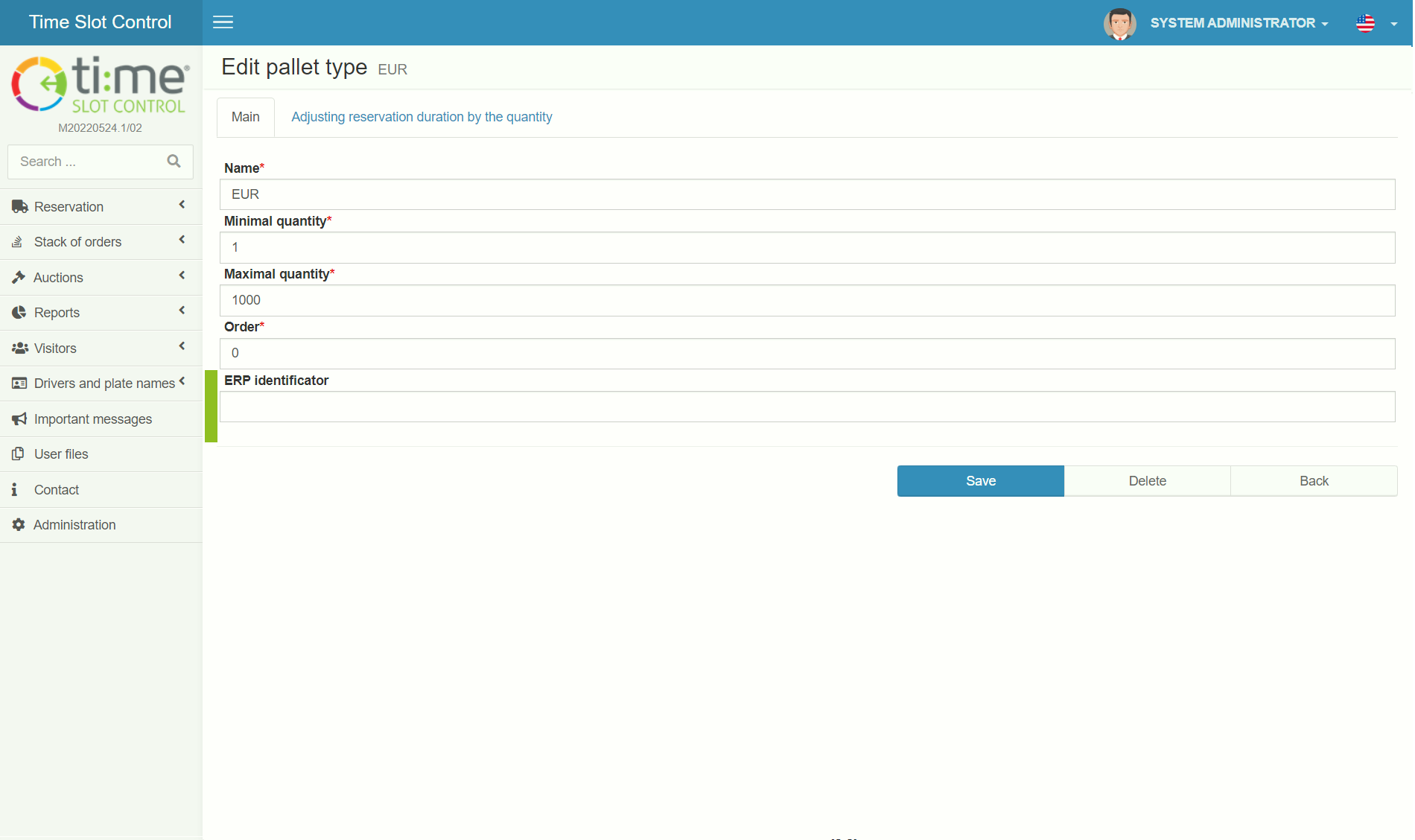
- Do the first integration on the Company entity and synchronize the ERP company code with TSC, at least for companies for which orders will be created (be sure to fill in IntegrationId – PK in ERP).
- Order entity integration – Most metadata is not mandatory in TSC, recommended metadata is listed below.
- OrderRow entity integration.
¶ Recommended Metadata For Integration
Detailed specification for these and other entities are available in OData metadata at the URL:
https://api.timeslotcontrol.com/odata/v1/{tenant}/$metadata
¶ Recommended Metadata For Order
- Id – type "Edm.Guid" – PK in TSC – Do not fill out when creating
- IntegrationId – type "Edm.String" – PK in ERP
- OrderDate – type "Edm.DateTimeOffset" – Date the order was made, in ERP
- DeliveryDate – type "Edm.DateTimeOffset" – Planned delivery date
- OrderNumber – type "Edm.String" – Order number
- OrderType – type "TSC.API.ODATA.OrderType" – Purchase/Sale
- PaymentTerms – type "Edm.String" – Payment terms
- PurchaseOfficer – type "Edm.String" – Name of the user who created the order in ERP
- Supplier/Recipient/Customer/Carrier – When entering *Id or *IntegrationId, other metadata need not be entered if the company already exists in the TSC database
- Id – type "Edm.Guid" – PK in TSC – Do not fill out when creating
- IntegrationId – type "Edm.String" – PK in ERP – Needed for linking and tracing to ERP records
- Name – type "Edm.String" – Company name
- Street – type "Edm.String" – Street address
- City – type "Edm.String" – City
- PostalCode – type "Edm.String" – Postal code
- Country – type "Edm.String" – Country
- IdentificationNumber – type "Edm.String" – Identification number
- VAT – type "Edm.String" – VAT number
- TermsOfDelivery – type "Edm.String" – Incoterms
¶ Recommended Metadata For OrderRow
- Description – type "Edm.String" – Item description
- IntegrationId – type "Edm.String" – ID ERP
- NumberOfUnits – type "Edm.Int32" – Number of units (pallet units per UnitId)
- OrderId – type "Edm.Guid" – ID of the order that the line item belongs to
- OrderIntegrationId – type "Edm.String" – ERP ID – The order row can also be linked using the ERP order identifier
- UnitId – type "Edm.Guid" – ID of the pallet unit
- UnitIntegrationId – type "Edm.String" – ERP ID of the pallet unit
- Order – type "Edm.Int32" – Row sequence on the order
¶ Playground
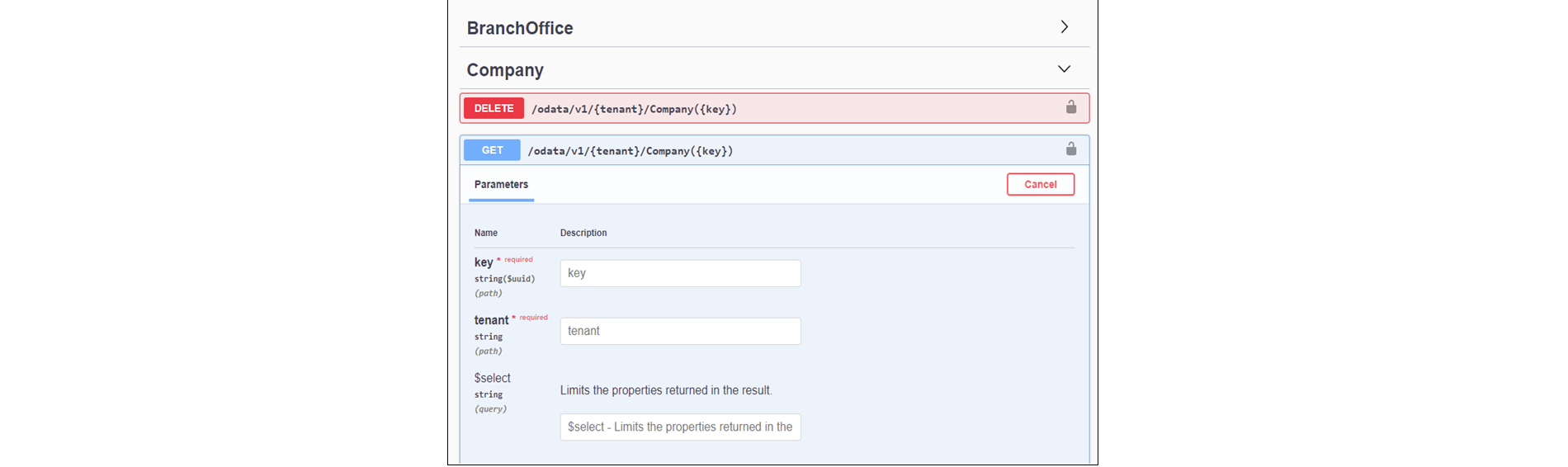
For custom REST interfaces and OData, the TSC API offers Swagger UI, where individual functions can be tested without programming. Just generate a JWT or log in with basic authentication through a dedicated API account. Then each function can be called exactly as in code and any CURL queries can be acquired.
In any web browser, open the URL: https://api.tscsandbox.com/
Select OData or TSC REST definition:

Log in via Authorize.
Now you can browse and test the individual functions.
REST:

¶ Examples
¶ Connecting Microsoft Excel To An OData Feed
- Launch Microsoft Excel
- Click on the Data tab
- In the menu select Get external data > From other sources > From OData data feed
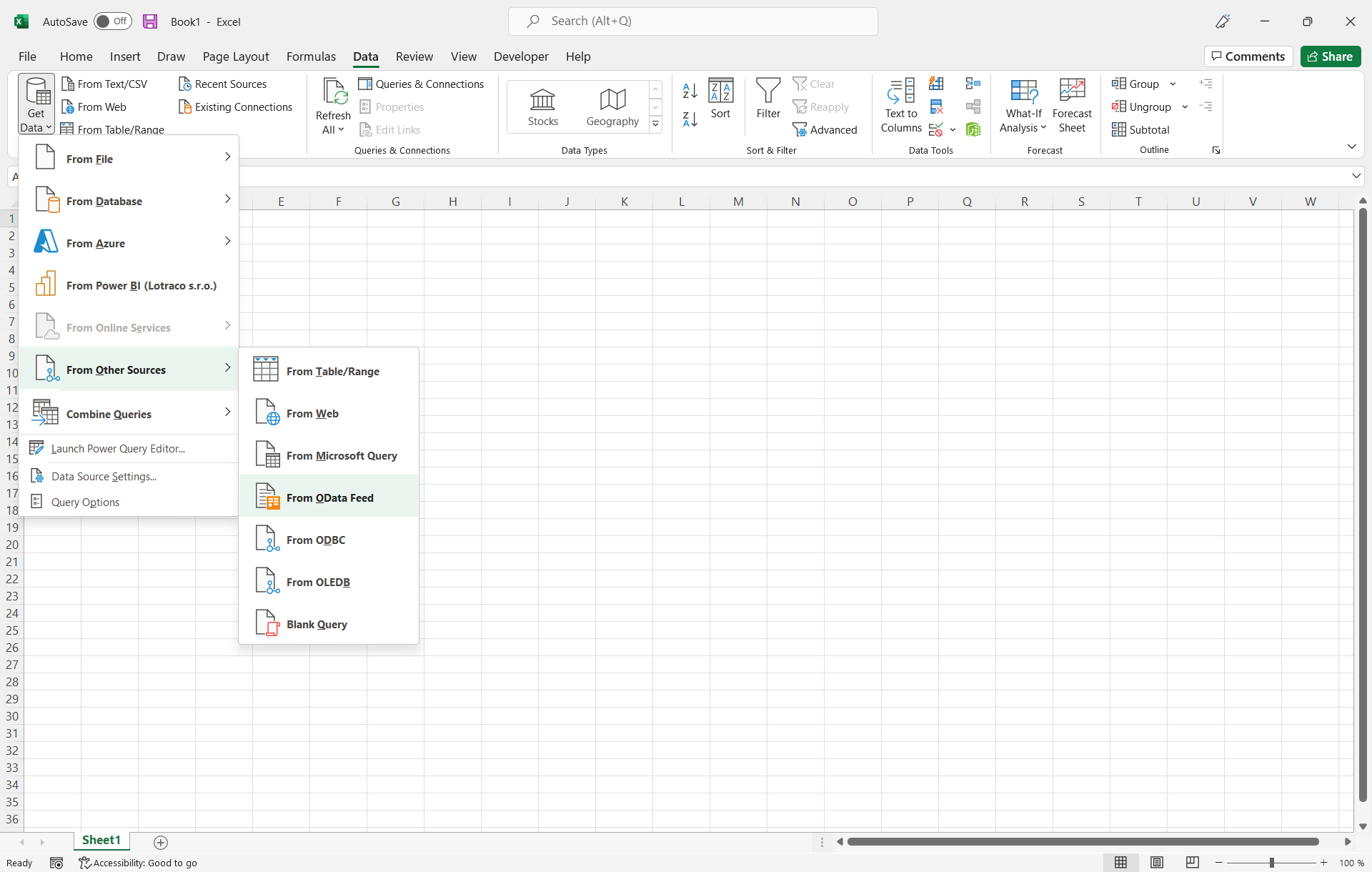
4. In the URL Address field enter: https://api.timeslotcontrol.com/odata/v1/[yourtenant]

5. Switch user authentication to Basic

6. Enter the API username and password and click the Connect button
7. A list of available entities in the TSC system is displayed for further processing
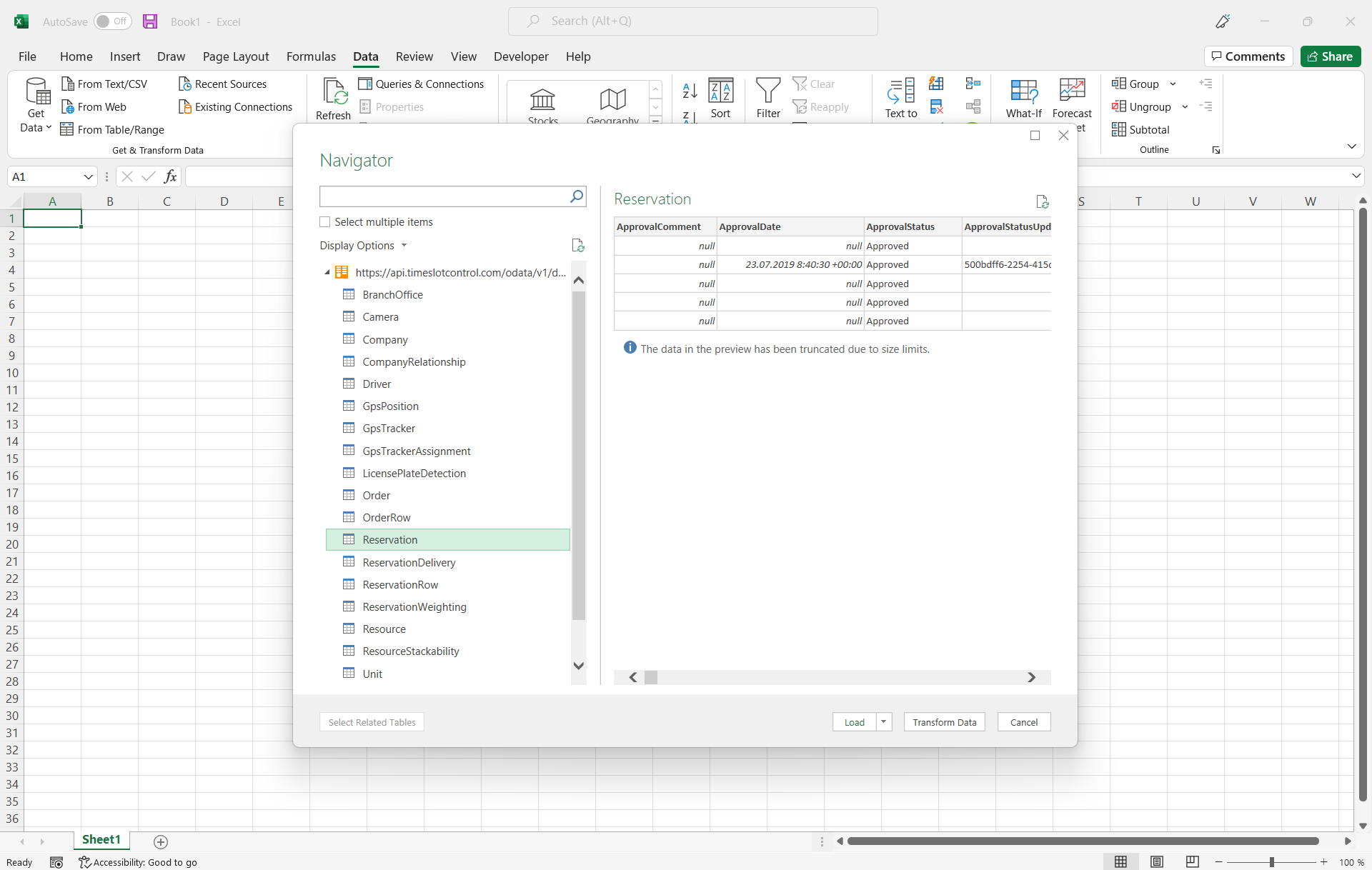
8. Data can be loaded from one or multiple selected entities into individual tables or can be used to generate contingency tables and graphs
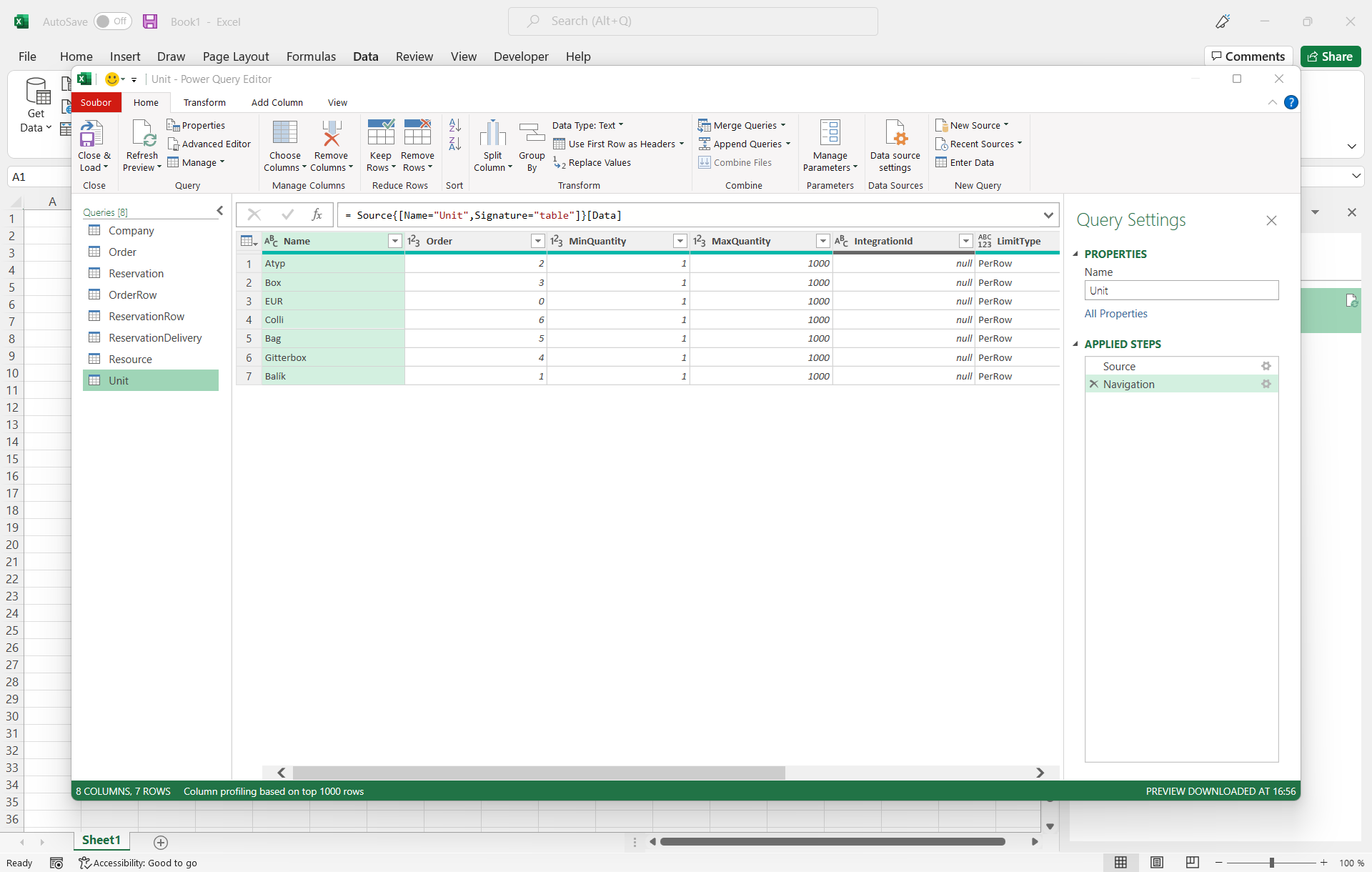
- Once sample documents have been created and saved, data can be updated at any time from the current data in the TSC application online by choosing Refresh all in the Data tab
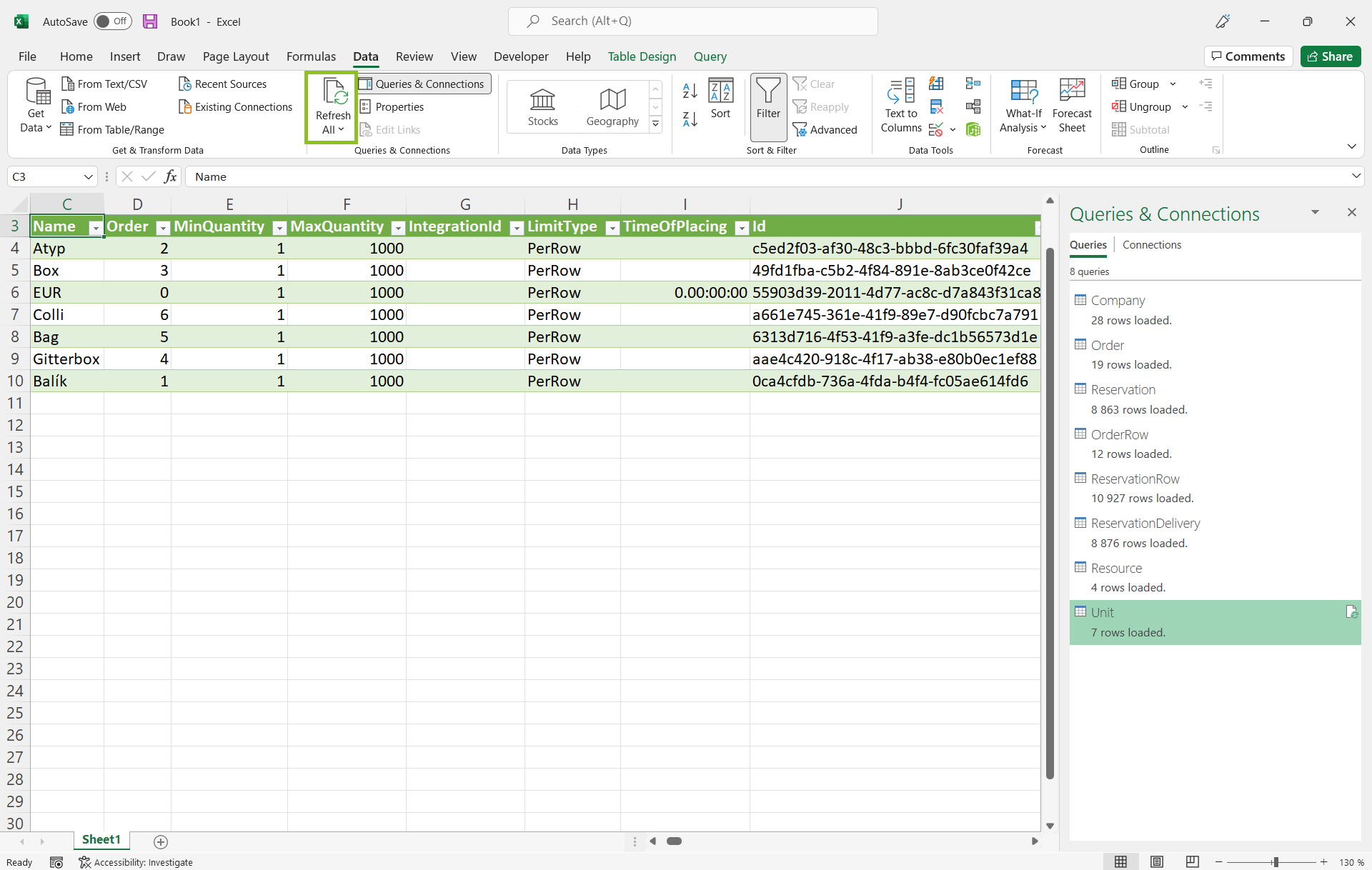
Microsoft Excel only supports data as read-only, so connecting directly to the TSC production environment is also possible without the need to test in the sandbox environment.
Other applications, such as Power BI, can be connected likewise to create interactive reports.