¶ Cameras administration - Create camera
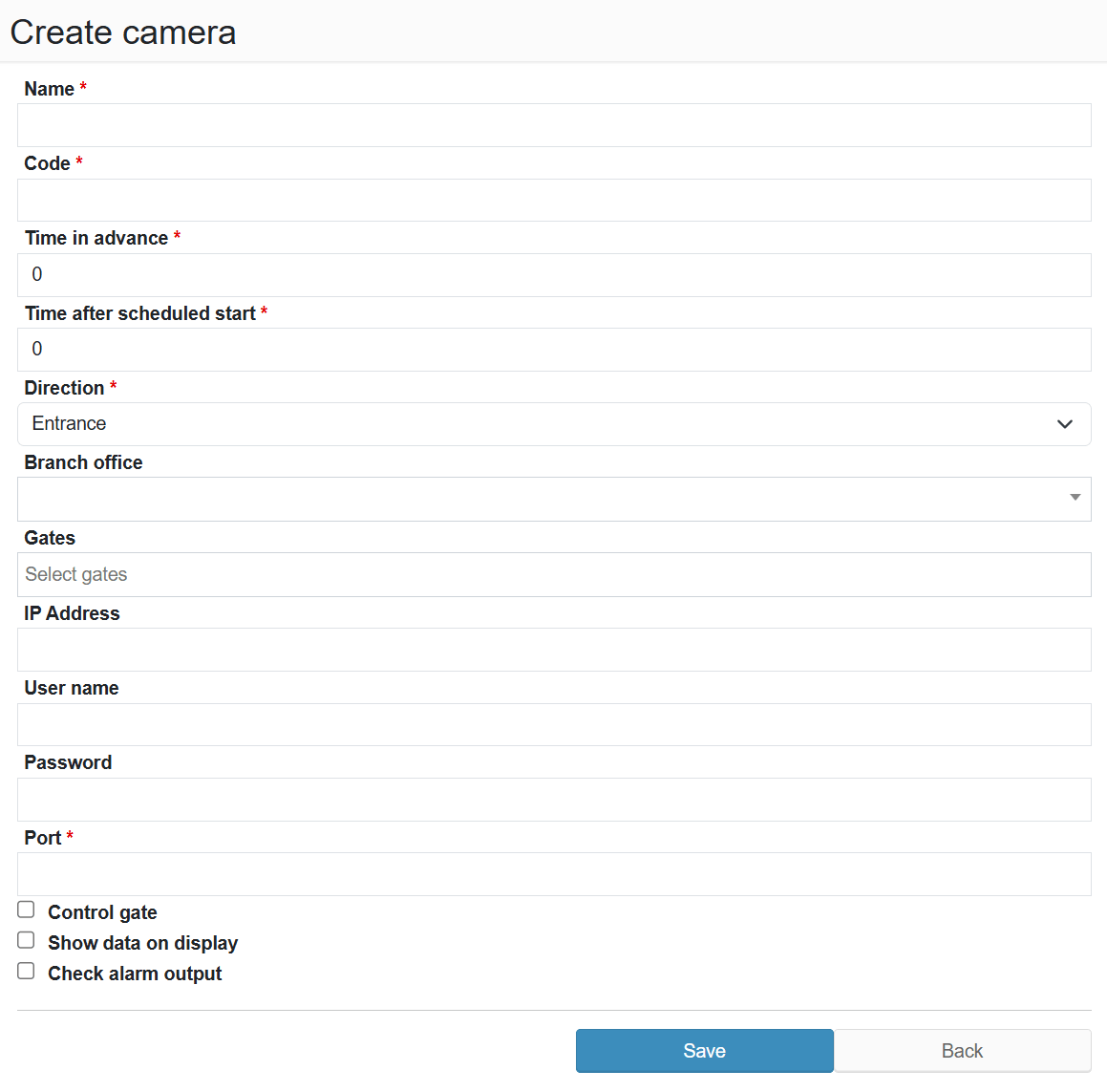
Form for adding a new camera to the system.
¶ Legend
Name
Camera name (required).
Code
Unique camera identifier (required).
Lead time
Time before the planned start when the camera activates (required).
Time after planned start
Time after the planned start during which the camera remains active (required).
Direction
Vehicle movement direction (dropdown: Entry / Exit; required).
Branch
Assign the camera to a branch (dropdown).
Docks
Assign the camera to docks (multi-select).
IP Address
Camera IP address.
Username
Login name for camera authentication.
Password
Password for camera authentication.
Port
Camera network port (required).
Control gate
Checkbox to enable gate control via the camera.
Show data on display
Checkbox to send reservation data to the LED or information panel at the entry or exit — when enabled, the camera passes the recognised plate to the system, which then shows relevant details (e.g. reservation number, carrier) on the panel visible to the driver or operator.
Monitor alarm output
Checkbox to enable monitoring of the camera's hardware alarm output — IP cameras have a relay or digital output that can signal various events (e.g. unrecognised plate, intrusion detection). When enabled, the system actively monitors this output signal and can react accordingly.