¶ System Settings - Main
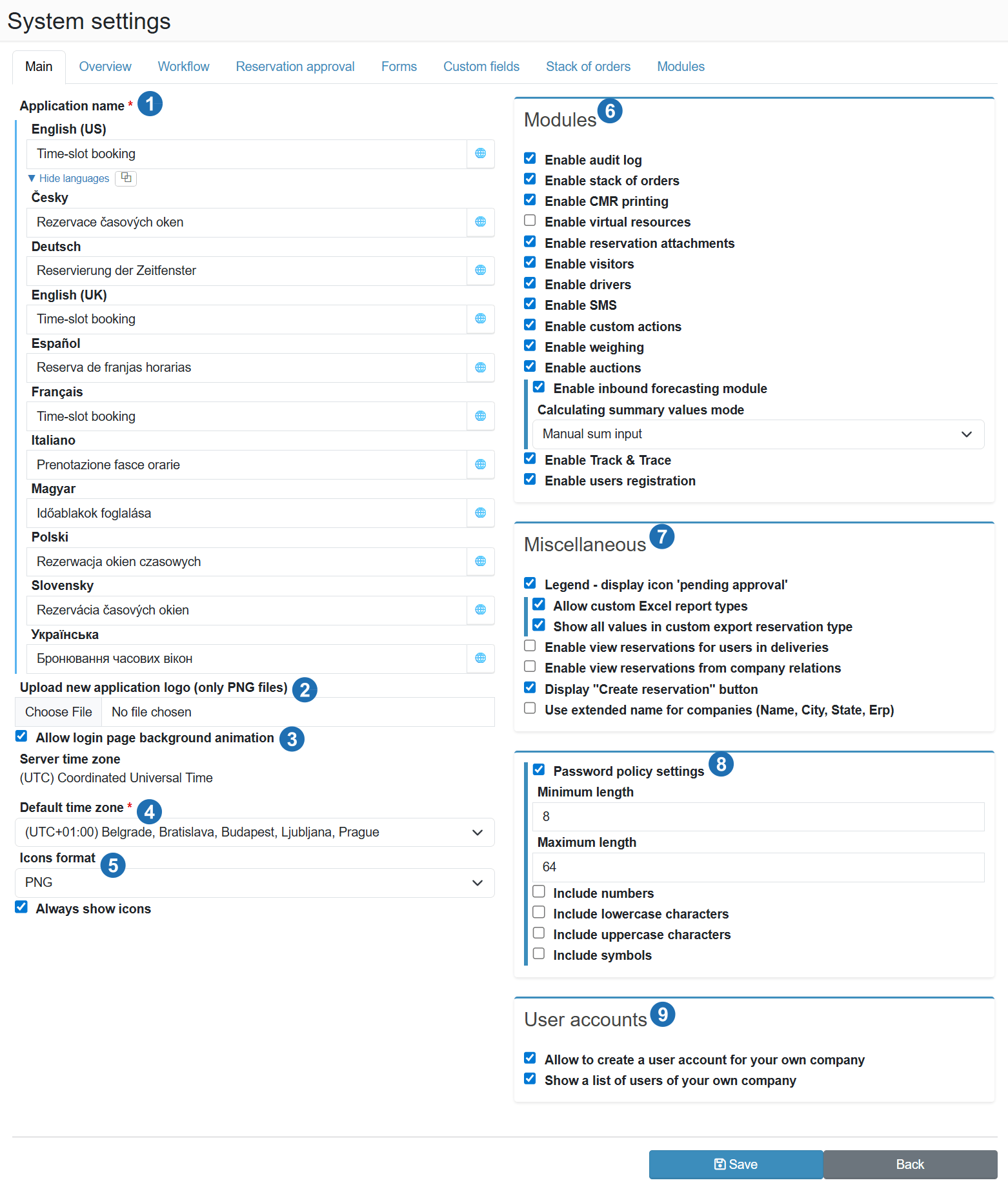
¶ Application name (1)
Application name
Multilingual name displayed in the application header and on the login page. Each language can be entered separately - users see the name according to their language setting. The globe icon next to the field opens automatic translation.
¶ Upload new application logo (2)
Upload new application logo
Custom logo displayed in the application header. Only PNG format is supported. The logo should have a transparent background and sufficient resolution for clean rendering in the header.
¶ Login page animation (3)
Enable background animation on the login page
Enables an animated background on the application login page. This is a visual effect with no impact on functionality or performance.
¶ Time zone (4)
Server time zone
Read-only field showing the current server time zone - cannot be changed. Serves as a reference value for comparison with the default user time zone.
Default user time zone
Default time zone assigned to new users. Affects how reservation times are displayed throughout the application. Users can change their own time zone individually in their profile.
¶ Icon format (5)
Icon format
Sets the format of icons used in the application interface - PNG or SVG. SVG icons are vector-based and render sharply on high-resolution screens (Retina, 4K).
Always show icons
When enabled, icons are permanently displayed next to text labels. When disabled, icons may be hidden or shown only on hover depending on the screen resolution.
¶ Modules (6)
Modules extend the core functionality of the application. Disabling a module hides the relevant sections and features throughout the application.
Enable audit log
Activates a change history log - every modification to a reservation, user or other object is recorded with a timestamp and user identification. Useful for tracking who made a change and when.
Enable stack of orders
Activates the order stack module, where orders can be recorded and linked to reservations. Suitable for warehouses that receive orders from an ERP system and need to match them to specific time slots.
Enable CMR printing
Allows generating and printing CMR waybills directly from the reservation detail. Requires a pre-configured CMR template.
Enable virtual resources
Activates support for virtual docks - resources that do not correspond to a physical dock but are used for internal planning or tracking transports that do not physically use a loading bay.
Enable reservation attachments
Allows carriers to upload files to reservations (CMR, delivery notes, photo documentation). The attachment types also need to be configured in the administration.
Enable visitors module
Activates driver visit tracking - training records, site entries and training validity. Suitable for warehouses with mandatory entry training or security protocols.
Enable drivers module
Activates a driver database linked to companies. Carriers can assign a specific driver from the database to a reservation instead of manually entering a name and phone number.
Enable SMS
Activates sending SMS notifications to carriers or internal users. After enabling, SMS notification rules need to be configured and an SMS gateway connected.
Enable user actions
Allows configuring custom buttons on the reservation detail - advancing to the next status, sending an SMS, displaying a confirmation form, etc. Actions are managed in the Reservation user actions section.
Enable weighing module
Activates integration with weighing systems and records vehicle weight on arrival and departure from the premises.
Enable auctions module
Activates the auction module, where transports can be listed for bidding and carriers compete with price offers. The transport is awarded to the carrier with the best bid.
Enable revenue prediction module
Activates cargo volume forecasting based on reserved time slots. Helps plan human resources, handling equipment and costs. Enables fields on the reservation form for entering the expected weight and volume of the shipment (planned values, not physical weighing). When enabled, the summary value calculation method becomes available: Manual sum entry - the user enters the total directly into the field, or Automatic calculation - the system sums values from individual delivery lines.
Enable Track & Trace
Activates real-time vehicle location tracking via GPS trackers. Requires tracker configuration in the Track & Trace section and tracking parameter setup.
Enable user registration
Allows external users (carriers) to register in the application independently without an administrator creating their account. New accounts can be automatically activated or held pending administrator approval.
¶ Miscellaneous (7)
Legend - show 'pending approval' icon
Displays a special icon in the schedule legend for reservations in the Pending approval status. Makes it easier to quickly identify unapproved reservations in the schedule without opening the detail.
Enable custom Excel report types
Allows administrators to upload custom Excel templates for data export. Reports then reflect the specific needs of the organisation and can include company formatting or calculations.
Show all values in custom reservation export type
When enabled, the custom reservation export includes all available data fields. When disabled, only the fields explicitly selected in the export template configuration are exported.
Allow reservation visibility for users in deliveries
Allows users to access reservations via deliveries - if a user is linked to a delivery, they can see the associated reservation even without direct role-based access.
Allow reservation visibility for users of linked companies
Extends reservation visibility to users from companies linked to the reservation originator's company. Useful when a customer or partner needs to track their carrier's transports.
Allow display of "New reservation" button
Shows the button for creating a new reservation directly in the main schedule view. When disabled, reservation creation can be restricted to the stack of orders or another controlled process.
Use extended company name
In dropdown menus and overviews, displays the company name in the format: Name, City, Country, ERP code. Helps distinguish companies with the same or similar name from different locations.
¶ Password policy settings (8)
Minimum length
Minimum number of characters a password must meet when created or changed. The recommended value is at least 8 characters.
Maximum length
Maximum permitted number of characters in a password. A value that is too low may restrict the use of password managers that generate long random strings.
Include digits / lowercase / uppercase / symbols
When checked, the system requires the password to contain at least one character of the given type. Combining multiple requirements increases resistance to brute-force attacks.
¶ User accounts (9)
This section controls the visibility of the My Company module in the application's left menu. If both options below are disabled, the My Company menu item will not appear.
Allow creating a user account for own company
Allows users from the own (internal) company to create new user accounts within the same company without administrator involvement. Suitable for larger organisations that delegate user management to team leaders. When enabled, a user management tab appears in the My Company section.
Show list of own company users
Displays a list of other users from the same company to the logged-in user. Useful for internal coordination - the user can see who from their company has access to the application without needing administrator rights. When enabled, a user list tab appears in the My Company section.