¶ System Settings - Stack of orders
The Stack of orders tab covers:
- General stack rules
- Order form and order numbering
- Custom fields for orders
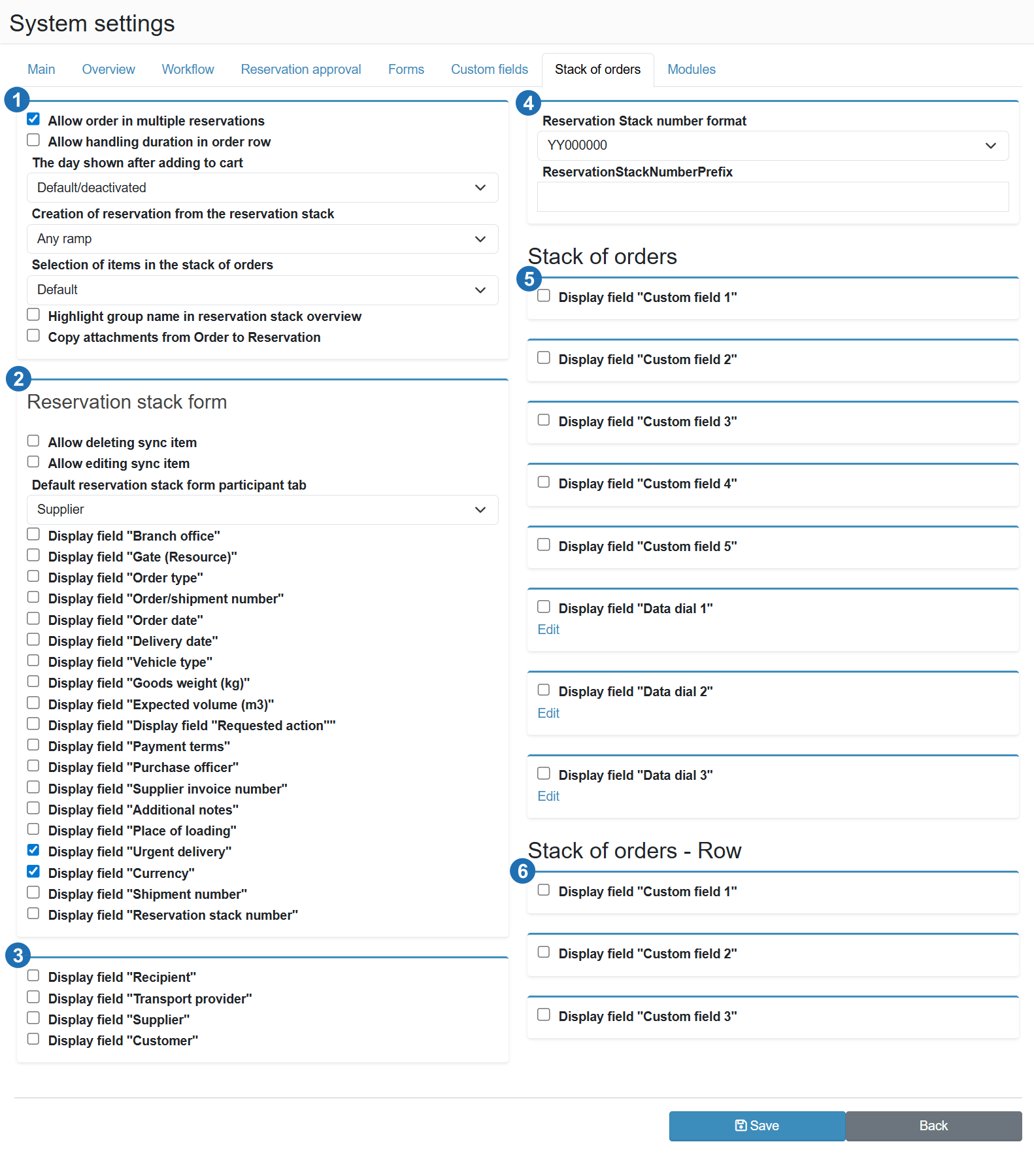
¶ Stack settings (1)
Allow order in multiple reservations
Allows a single stack order to be linked to more than one reservation. Suitable for situations where a shipment is processed in stages across multiple docks or separate transport legs.
Allow processing time on order row
Adds a planned processing time field to the order row. Allows tracking how long each stack item takes to process and use this value for capacity planning.
Day displayed after adding an order
Determines which day is shown in the stack overview after a new order is added. Default/deactivated keeps the currently displayed day without switching.
Create reservation from stack
Determines which dock a reservation is created on when an order is moved from the stack to the schedule. Any dock = the user selects the dock manually. Other options may restrict selection to a specific resource type.
Item selection in the stack of orders
Controls how items are selected from the stack when assigning them to a reservation. Default = standard behaviour without restrictions. Other options can filter the available items based on order or dock attributes.
Highlight group in the stack of orders overview
Colour-codes orders belonging to the same group in the stack overview. Makes it easier to navigate a large stack and visually track group cohesion.
Copy attachments from order to reservation
Files attached to an order in the stack are automatically copied to the linked reservation. Ensures documentation (delivery notes, specifications) is available directly on the reservation without manual transfer.
¶ Order stack form (2)
Allow deletion of a synchronised item
Allows users to delete a stack item that was synchronised from an external system (ERP/WMS). Without this toggle, synchronised items are protected from deletion.
Allow editing of a synchronised item
Allows manual editing of fields on a synchronised order. Without this toggle, synchronised items are read-only and all changes must come from the external system.
Default participant tab on the stack item form
Determines which participant tab (Supplier, Receiver, Carrier, Orderer) is shown first when the order form is opened. Set this to the party most relevant to your operation.
Show field "Branch"
Adds a branch selection field to the order form. Useful for centrally managed stacks where orders are destined for different plants or warehouses.
Show field "Dock (Resource)"
Adds a preferred dock field directly to the order form. Allows specifying which dock should process the order already at the time the order is entered into the stack.
Show field "Order type"
Adds a field for categorising the order (inbound, outbound, internal transfer, etc.). Suitable for operations where orders differ by operation type and need to be distinguished in the stack.
Show field "Order/shipment number"
Adds a field for the order or shipment number. Used to match the stack order with documents in an external system or to look up the order by its ERP number.
Show field "Order date"
Adds a field for the order creation or entry date. Allows tracking the age of orders in the stack and filtering by order date.
Show field "Delivery date"
Adds a field for the requested delivery date to the customer. Allows dispatchers to plan reservations with delivery deadlines in mind and prioritise orders in the stack.
Show field "Vehicle type"
Adds a field for the required vehicle type. Allows considering the physical requirements of the shipment when planning the stack and assigning the order to the correct dock or reservation.
Show field "Shipment weight (kg)"
Adds a field for the total shipment weight in kilograms. Used for capacity planning or for comparing against the weight measured at the scales.
Show field "Estimated volume (m3)"
Adds a shipment volume field in cubic metres. Suitable for operations where shipment volume affects dock selection or capacity planning.
Show field "Requested action"
Adds a field for specifying the requested action (loading, unloading, etc.) at the order level in the stack.
Show field "Payment terms"
Adds a payment terms field to the order. Used in operations where payment terms affect processing priority or invoicing method.
Show field "Purchasing officer"
Adds a field for the name of the buyer or purchasing officer responsible for the order. Used to identify the contact person in case of claims or discrepancies.
Show field "Supplier invoice number"
Adds a supplier invoice number field. Allows linking the stack order to billing documents and supports claims processing.
Show field "Notes"
Adds a free-text notes field to the order. Suitable for internal comments, warehouse instructions or supplementary information that has no dedicated field.
Show field "Loading location"
Adds a field for the loading location address or name. Used for orders where the loading point differs from the company's address.
Show field "Urgent delivery"
Adds an urgent delivery flag to the order. Visually distinguishes priority orders in the stack and allows dispatchers to quickly identify orders requiring expedited processing.
Show field "Currency"
Adds a currency selection field to the order. Suitable for operations processing orders in multiple currencies or for export to accounting systems.
Show field "Shipment number"
Adds a tracking or shipment number field. Allows linking the stack order to a specific shipment in a Track & Trace system.
Show field "Order number"
Adds an internal order number field. Differs from the shipment/order number - used for identification within internal systems or production orders.
¶ Displayed companies (3)
Show field "Receiver"
Adds a Receiver tab to the order form. Used to record the final consignee of the shipment at the order level in the stack.
Show field "Carrier"
Adds a Carrier tab to the order form. Allows assigning a carrier directly to the stack order independently of the carrier on the reservation.
Show field "Supplier"
Adds a Supplier tab to the order form. Used to record the goods supplier at the order level - suitable for inbound processes involving multiple suppliers.
Show field "Orderer"
Adds an Orderer tab to the order form. Used to record the entity that placed the order when the orderer differs from the supplier or receiver.
¶ Order number format (4)
Order number format
Template used to generate the order number in the stack. YY000000 = two-digit year + six-digit sequential number (e.g. 250001). The format can be customised to match internal order numbering requirements.
ReservationStackNumberPrefix
Optional prefix prepended to the order number. Allows distinguishing the stack number series from other number types in the system - for example "ORD-250001" instead of "250001".
¶ Stack of orders - custom fields (5)
Custom text fields and data dials added to the order form in the stack. Five text field slots and three data dial slots are available.
Show field "Custom field X"
Enables a free-text field in the stack order form. Suitable for internal codes, project numbers or any other attributes specific to orders in the given operation.
Show field "Data dial X"
Enables a dropdown list with predefined values in the stack order form. The list items are managed by clicking the Edit link below the field.
¶ Stack of orders - Row (6)
Custom text fields added to the order row level in the stack. Three slots are available.
Show field "Custom field X"
Enables a text field at the order row level in the stack. Suitable for item-specific attributes - for example article code, batch number or storage location.