¶ System Settings - Custom Fields
The Custom Fields tab lets you add custom fields to forms:
- Text fields, toggles and data dials
- Available for reservation, delivery and row forms
- Suitable for internal codes, project numbers or shipment-specific attributes
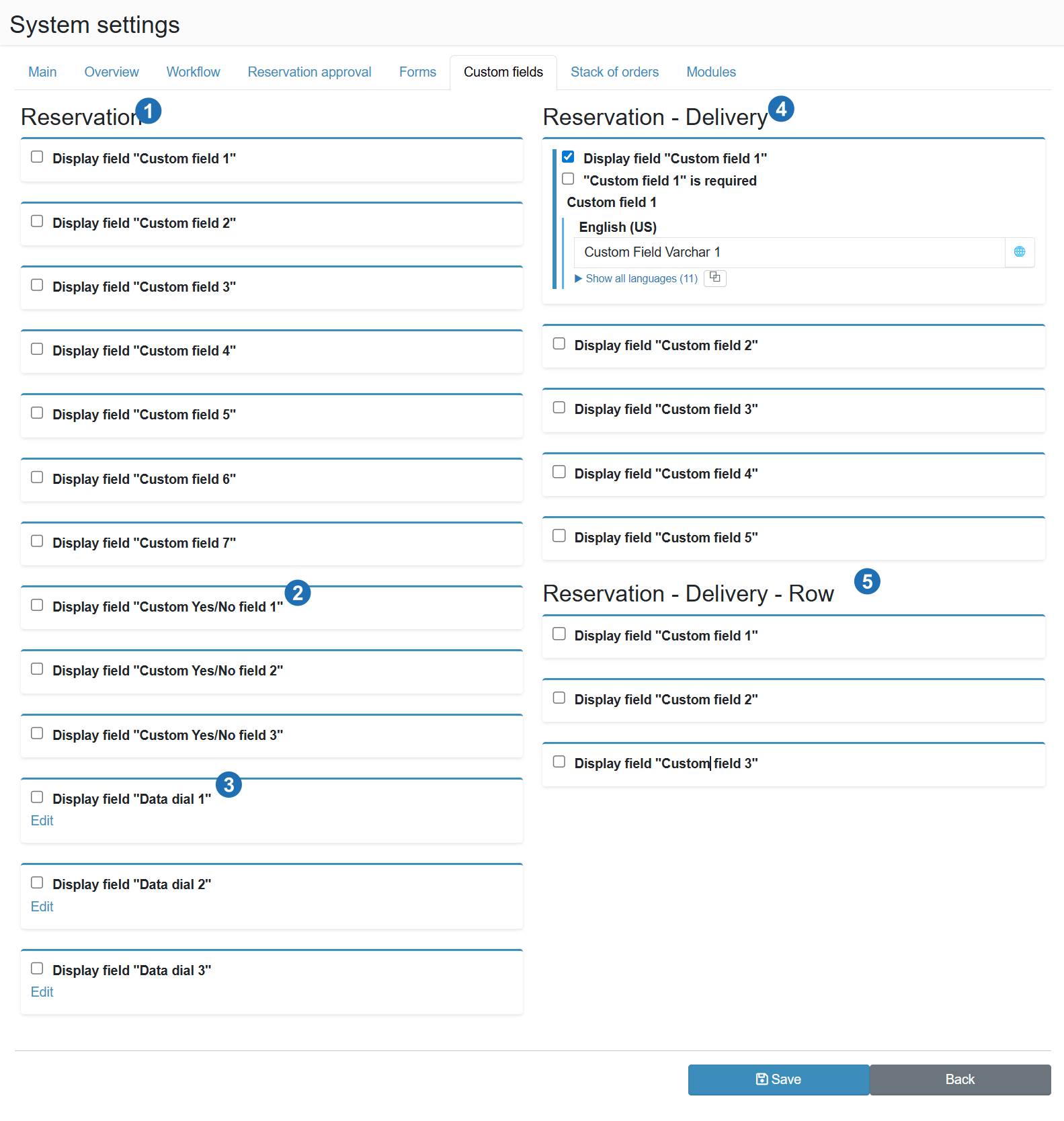
¶ Reservation (1)
Custom text fields added to the main reservation form. 15 slots are available (Custom field 1–15).
¶ Custom Yes/No fields (2)
Toggle fields (checkboxes) added to the reservation form. 15 slots are available (Custom Yes/No field 1–15). For each field you can turn on its display, set it as required and enter a multilingual name. The fields can be used in forms, custom actions, notifications and integrations, and their display can also be set per branch (see New branch).
¶ Data dial (3)
Fields with selection from a predefined list of values added to the reservation form. Three slots are available.
¶ Reservation - Delivery (4)
Custom text fields added to the delivery form within a reservation. Five slots are available (Custom field 1-5). Unlike the reservation-level fields, these also support a required flag and a multilingual label.
¶ Reservation - Delivery - Row (5)
Custom text fields added to the delivery row form. Three slots are available (Custom field 1-3).