¶ Reservations - Approval
¶ Pending for approval
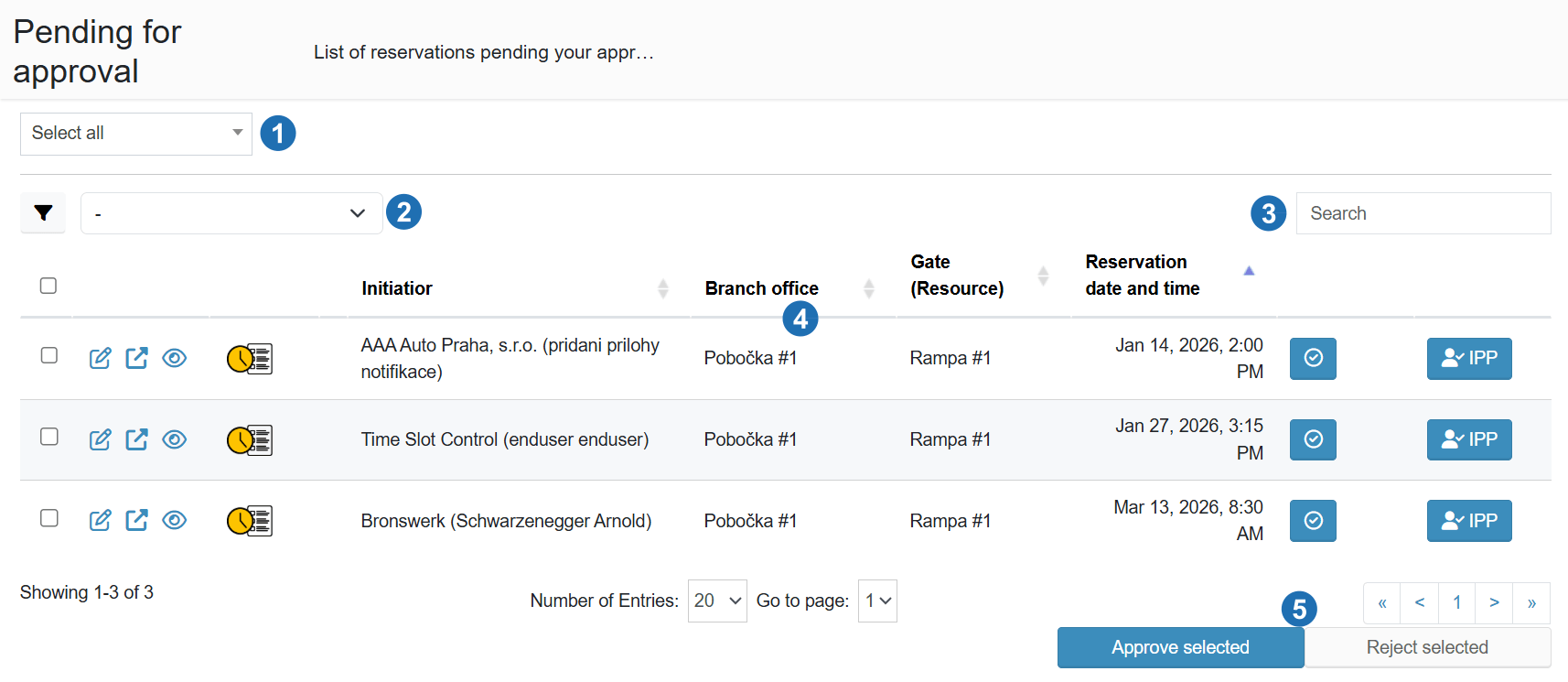
The Approval section is used to manage reservations that are waiting for approval.
It allows quick review and bulk approval or rejection.
¶ Approval methods
A reservation can be approved in two ways:
- Directly in the calendar — clicking a reservation opens the detail view, where an approve or reject button is available.
- "Pending approval" section — a list of all waiting reservations accessible from the side menu, where reservations can be approved individually or in bulk.
¶ Rejecting a reservation
When rejecting, a dialog is shown with a field for entering the reason for rejection. The reason is mandatory and will be displayed to the requester in the email notification.
¶ Email notifications
After a reservation is approved or rejected, the system automatically sends an email notification to the requester with the result and, where applicable, the reason for rejection.
¶ Legend
-
Select all / bulk selection
- Allows quick selection of all reservations in the list
-
Advanced filter
- Used to filter reservations based on selected criteria
-
Search
- Full-text search within the reservation list
-
Reservation list
- Displays all reservations waiting for approval
- Contains basic information such as requester, branch, ramp, and reservation date
- Available actions for each reservation:
- reservation detail
- preview
- additional actions
-
Actions (Approve / Reject)
- Approve selected - confirms selected reservations
- Reject selected - rejects selected reservations (reason required)