¶ Monitor - Themes
¶ Monitor 1
¶ Filter
- Current day from 00:00 to 24:00
- Only approved reservations are shown until the status "Vehicle departed" is set
- Cannot be filtered by dock - displays all reservations across branches and docks
¶ Display
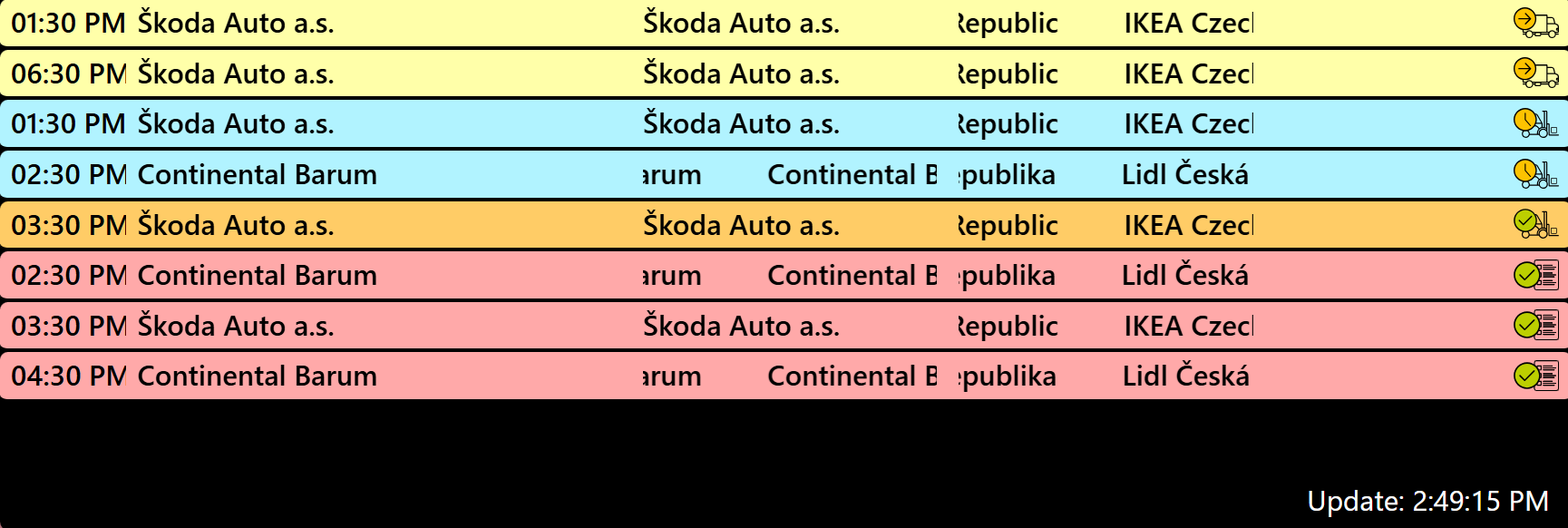
- Count of reservations awaiting approval
- 3 reservations per row
- Number of rows depends on monitor resolution (usually 3-4)
- Colour by action type:
- Loading → green
- Unloading → red
- Both → purple
- Carrier arrived without reservation → light yellow
- Reservations in status "Handling started" have red blinking borders
¶ Information on the displayed reservation
- Planned start and end of the reservation
- Action type : Company from the "Requester" field in the reservation
- Sender for inbound / recipient for outbound
- LP
- Dock and total unit count across all lines
¶ Monitor 2
¶ Filter
- Displays only one configured dock
- Current day from 00:00 to 24:00
- Only approved reservations are shown until the status "Vehicle departed" is set
¶ Display
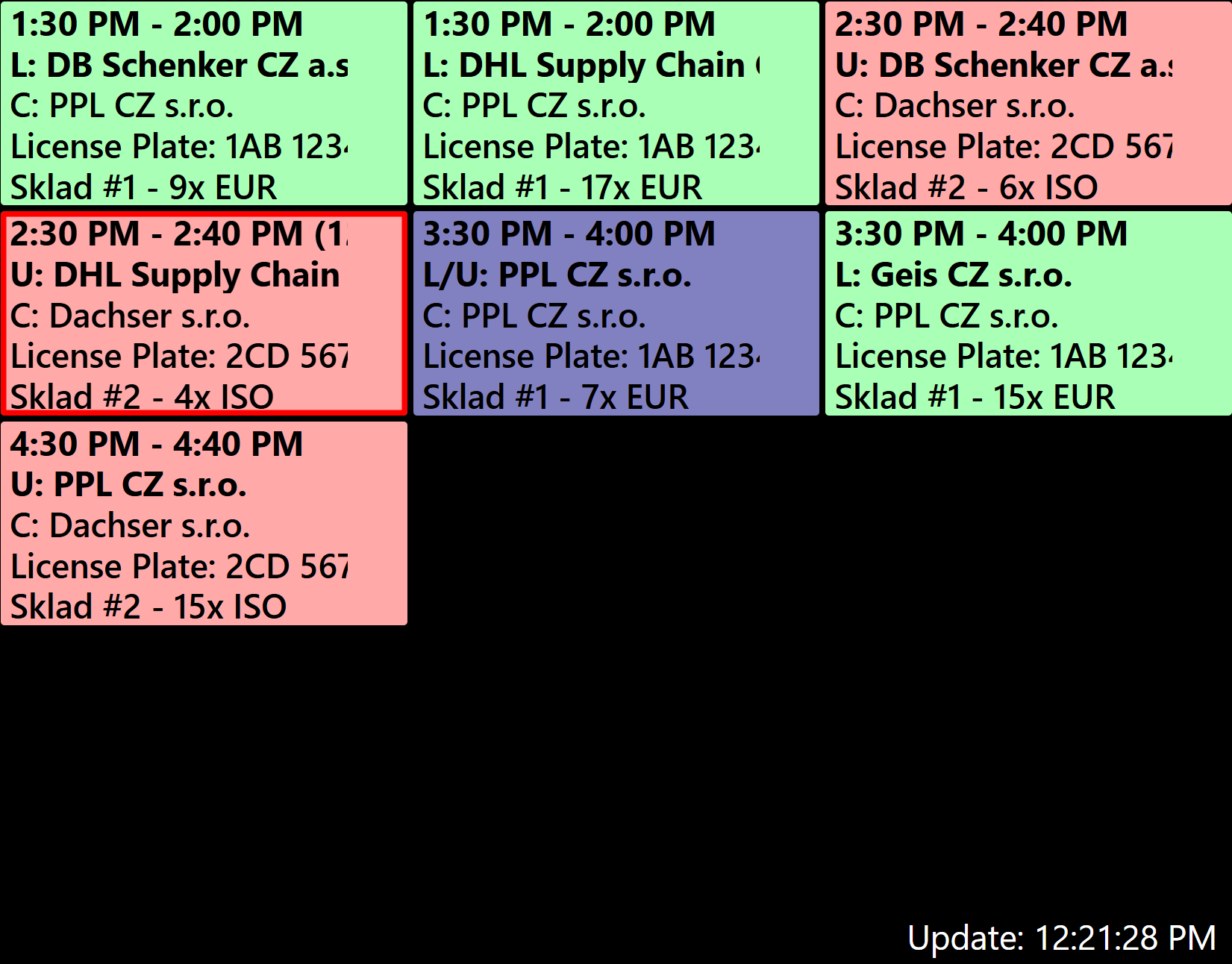
- Colour by reservation status:
- Approved reservation → red
- Vehicle arrived on site → yellow
- Carrier arrived without reservation → light yellow
- Flag shown for reservations marked as "Urgent delivery"
- 4 to 5 reservations displayed in a single column
- Overall statistics in the right column:
- Number of received units
- Time used
- Approved / Pending / Late / Arriving
¶ Information on the displayed reservation
- Planned start and end of the reservation
- Sender for inbound / recipient for outbound
- LP
- Total unit count across all lines
¶ Monitor 3
¶ Filter
- Current day from 00:00 to 24:00
- Only approved reservations are shown until the status "Vehicle departed" is set
- Can be configured to display individual docks (1-N)
¶ Display
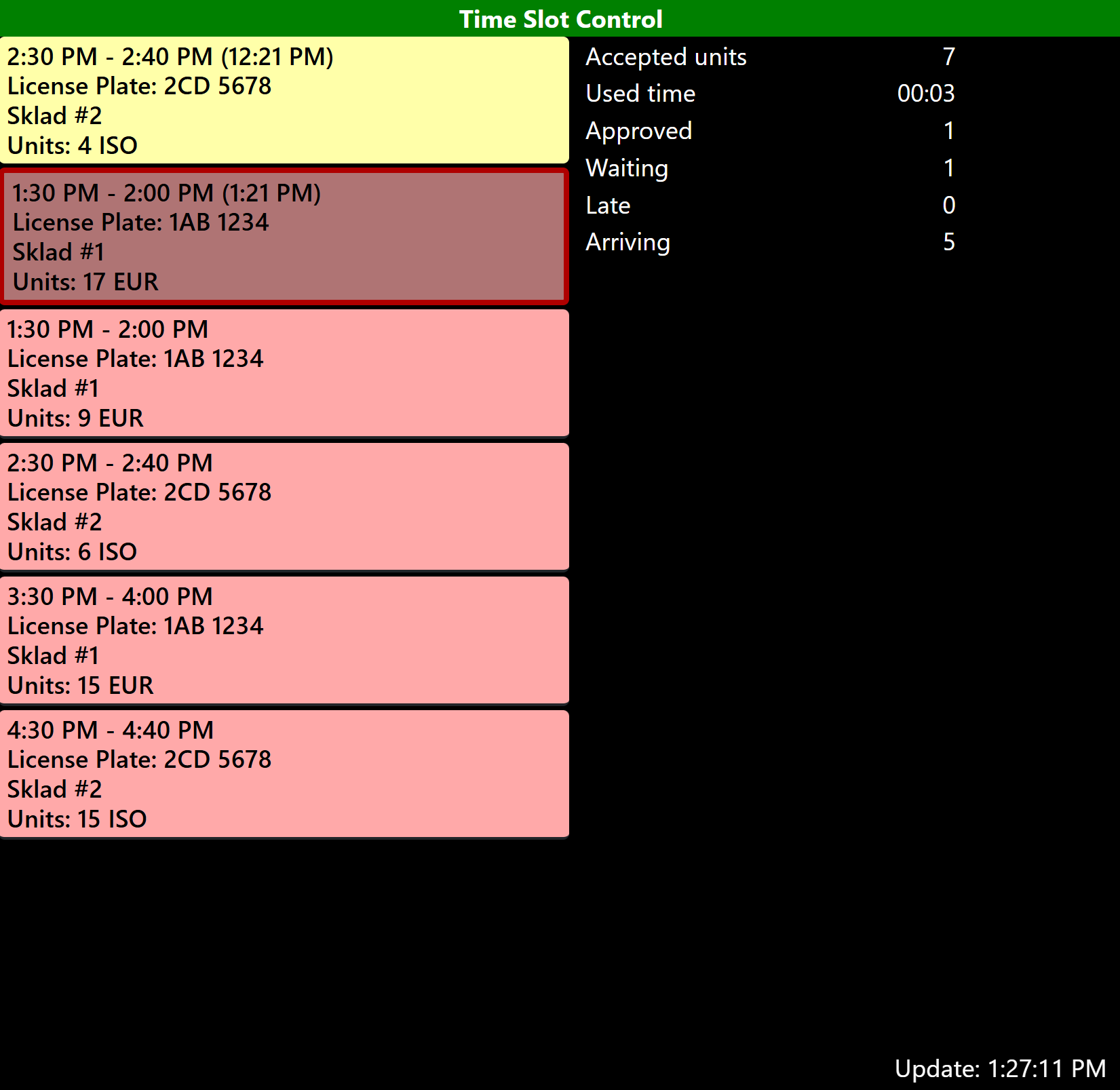
- Count of reservations awaiting approval
- 3 reservations per row
- Number of rows depends on monitor resolution (usually 3-4)
- Colour by action type:
- Loading → green
- Unloading → red
- Both → purple
- Carrier arrived without reservation → light yellow
- Reservations in status "Handling started" have red blinking borders
¶ Information on the displayed reservation
- Planned start and end of the reservation
- Action type : Company from the "Requester" field in the reservation
- Carrier
- LP
- Dock and total unit count across all lines
- Sender for inbound / recipient for outbound
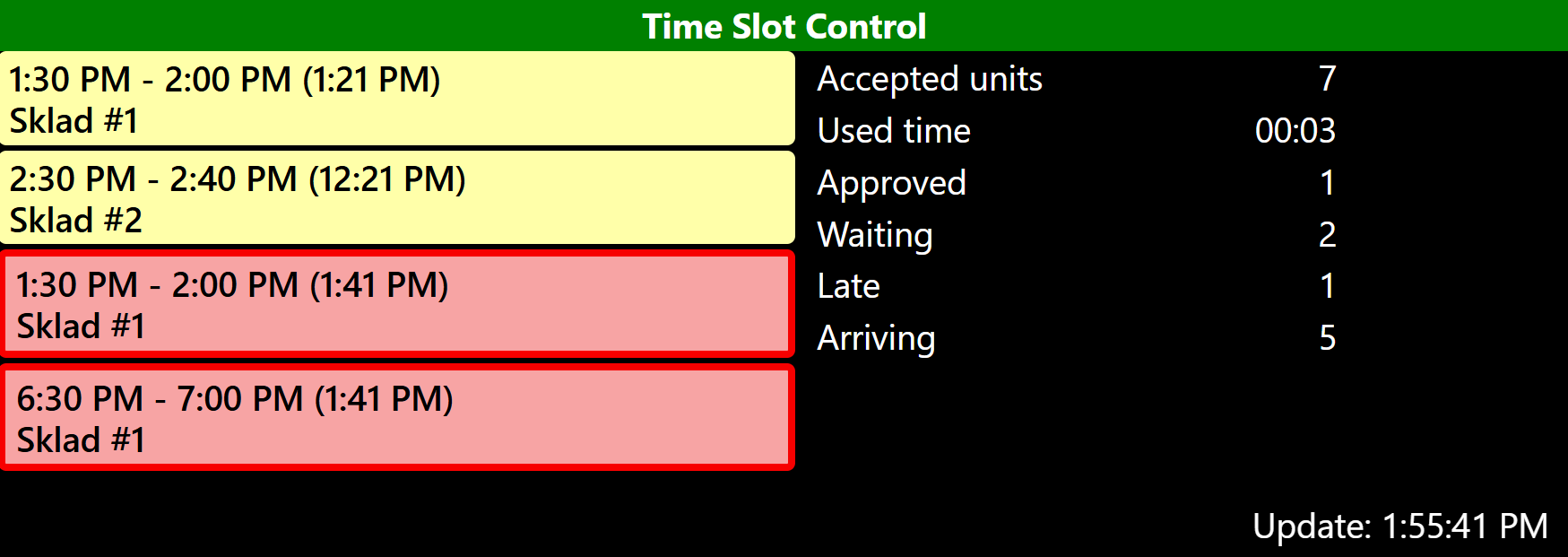
¶ Monitor 4
¶ Filter
- Displays only one configured dock
- Current day from 00:00 to 24:00
- Reservations are displayed only from status "Vehicle arrived" until "Vehicle departed"
¶ Display
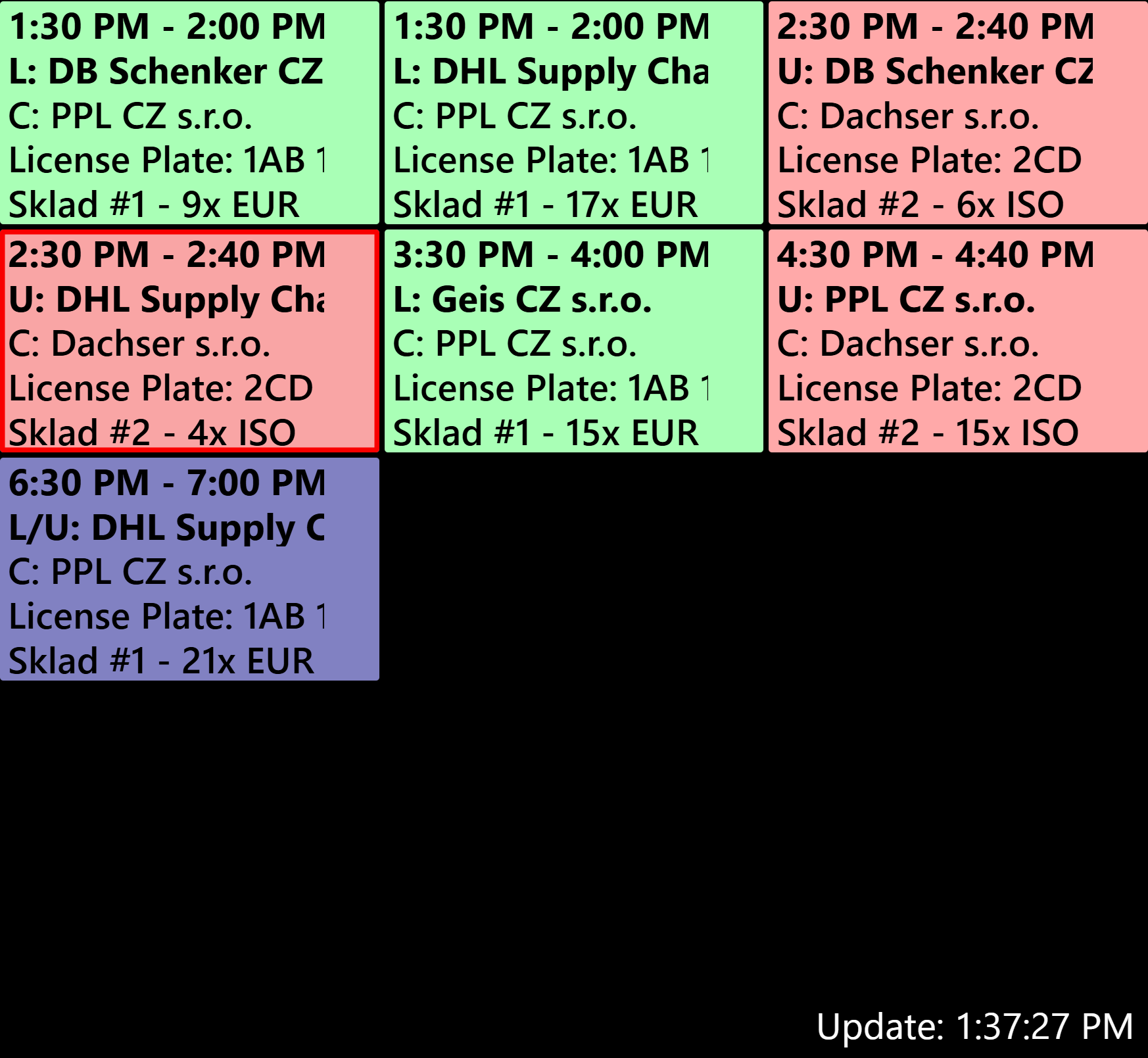
- Colour by reservation status:
- Vehicle arrived on site → red
- Processing started → yellow
- Carrier arrived without reservation → light yellow
- Flag shown for reservations marked as "Urgent delivery"
- 4 to 5 reservations displayed in a single column
- Overall statistics in the right column
¶ Information on the displayed reservation
- Planned start and end of the reservation
- Sender for inbound / recipient for outbound
¶ Monitor 5
¶ Filter
- Displays only one configured dock
- Current day from 00:00 to 24:00
- Only approved reservations are shown until the status "Vehicle departed" is set
¶ Display
- Dock displayed full screen
- Header shows the dock name and configured colour from Time Slot Control
- Colour by action type:
- Loading → green
- Unloading → red
- Both → purple
- Carrier arrived without reservation → light yellow
- 3 to 4 reservations displayed on one screen
¶ Information on the displayed reservation
- Planned start and end of the reservation
- Action type : Carrier
- Name and company from the "Requester" field in the reservation
- Sender for inbound / recipient for outbound
- LP
- Dock and total unit count across all lines
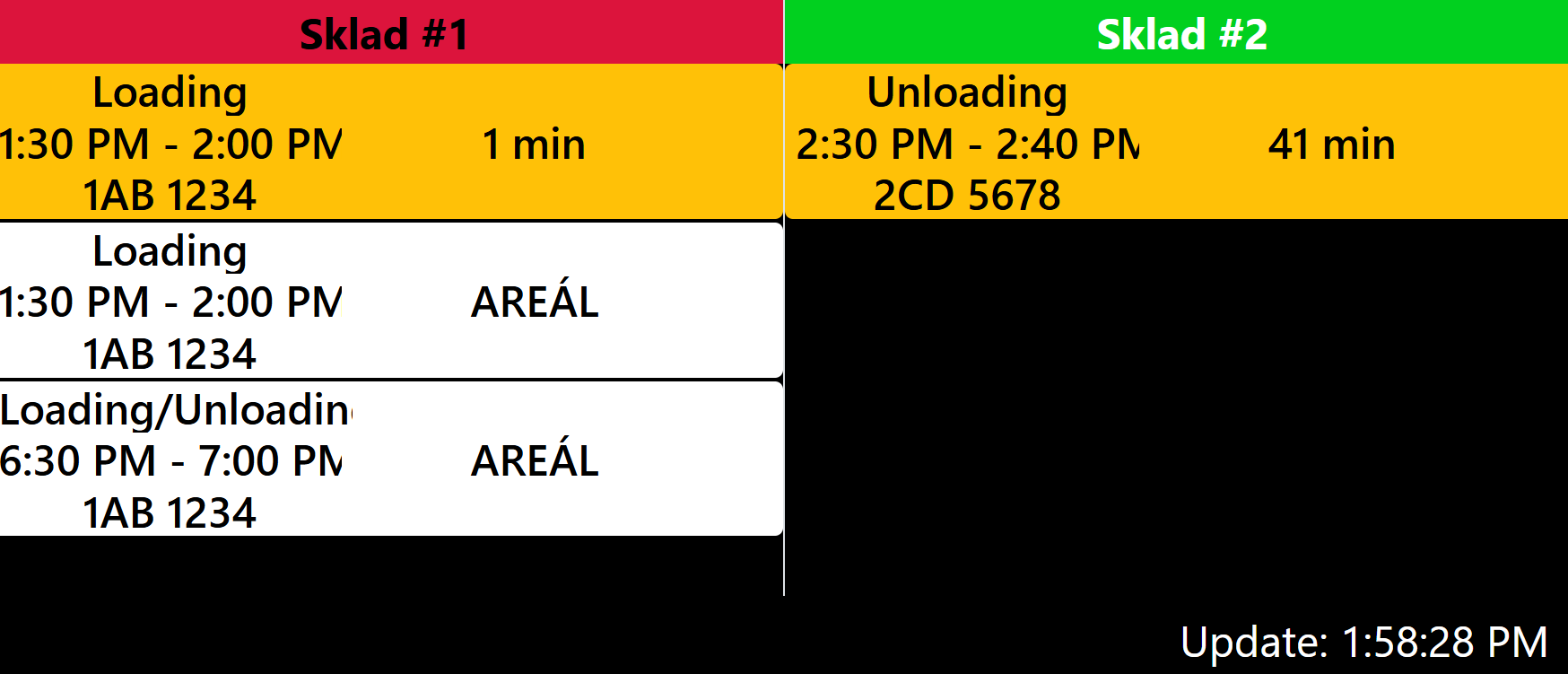
¶ Monitor 6
¶ Filter
- Displays only one configured dock
- Current day from 00:00 to 24:00
- Reservations are displayed only from status "Vehicle arrived" until "Vehicle departed"
¶ Display
- Dock displayed full screen
- Header shows the dock name and configured colour from Time Slot Control
- Colour by reservation status:
- Vehicle arrived on site → white
- Processing started → yellow
- Planned end time exceeded → red
- Flag shown for reservations marked as "Urgent delivery"
¶ Information on the displayed reservation
- Requested action (Loading / Unloading / Loading - Unloading)
- Planned start and end of the reservation
- LP (if LP is empty, displays "LP not entered")
- Sender for inbound / recipient for outbound
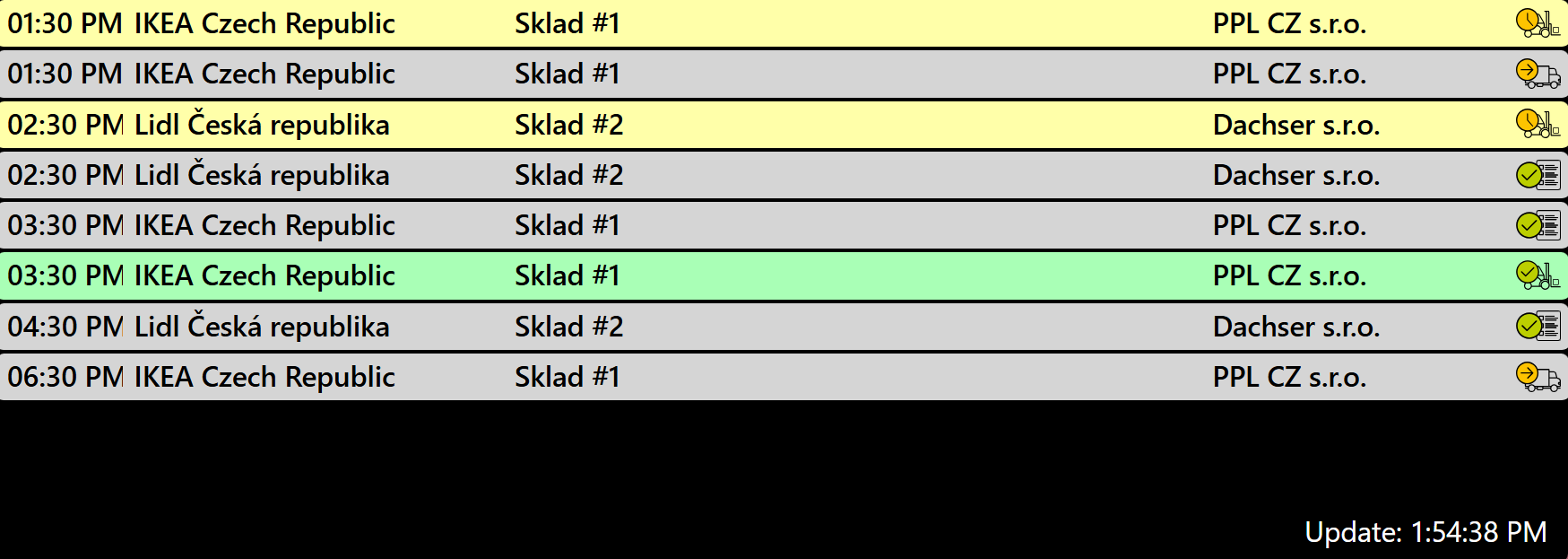
¶ Monitor 7_1
¶ Filter
- Current day from 00:00 to 24:00
- Only approved reservations are shown until the status "Vehicle departed" is set
- Can be configured to display individual docks (1-N)
¶ Display
- Displayed as a single full-column list
- Count of reservations awaiting approval
- Status icons shown on each reservation
- Colour by reservation status:
- Approved → grey
- Vehicle arrived on site → grey
- Processing started → yellow
- Processing completed → green
- Carrier did not arrive → red
¶ Information on the displayed reservation
- Planned start of the reservation
- Custom field 2
- Source (Dock)
- Sender for inbound / recipient for outbound
- Carrier
- Status icon
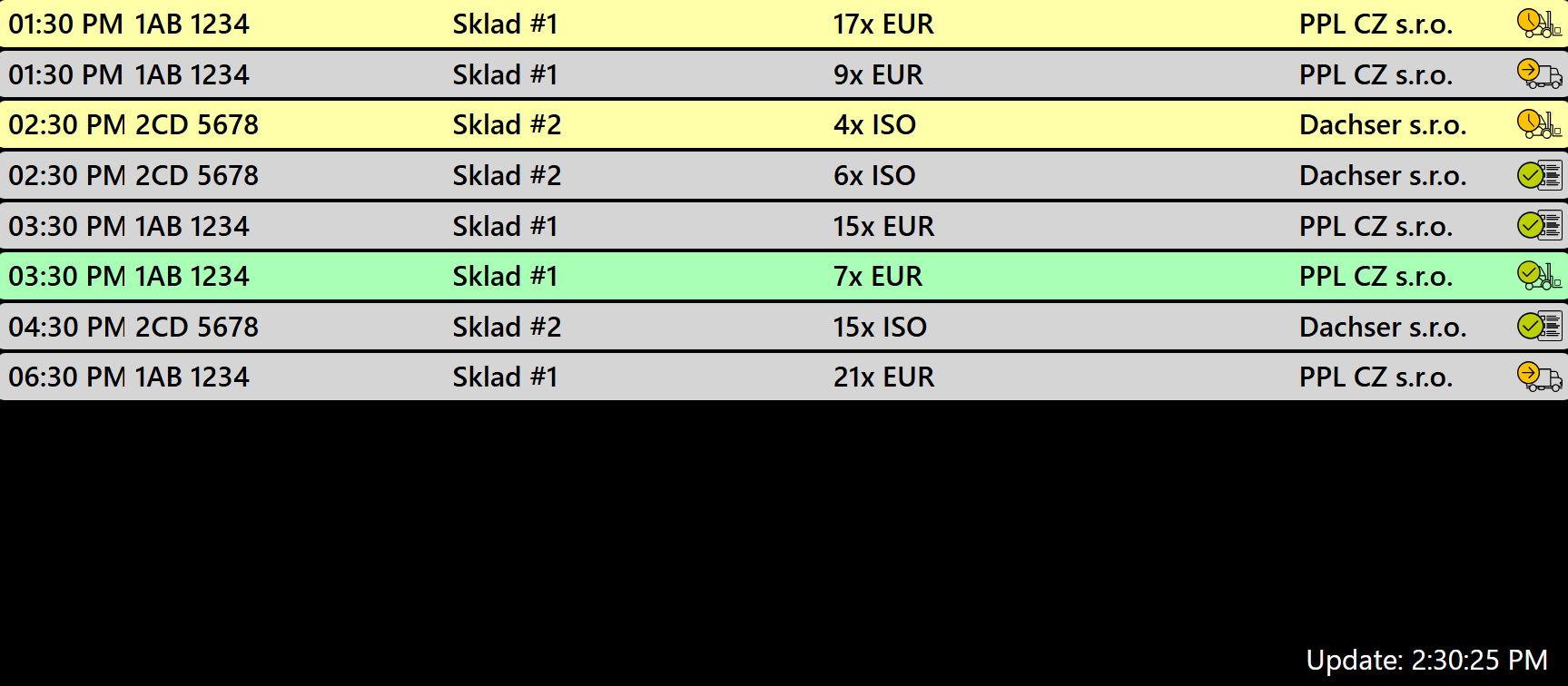
¶ Monitor 7_2
¶ Filter
- Current day from 00:00 to 24:00
- Only approved reservations are shown until the status "Vehicle departed" is set
- Can be configured to display individual docks (1-N)
¶ Display
- Displayed as a single full-column list
- Count of reservations awaiting approval
- Status icons shown on each reservation
- Colour by reservation status:
- Approved → grey
- Vehicle arrived on site → grey
- Processing started → yellow
- Processing completed → green
- Carrier did not arrive → red
¶ Information on the displayed reservation
- Planned start of the reservation
- LP
- Source (Dock)
- Total unit count across all lines and their type
- Sender for inbound / recipient for outbound
- Carrier
¶ Monitor 7_3
¶ Filter
- Current day from 00:00 to 24:00
- Only approved reservations are shown until the status "Vehicle departed" is set
- Can be configured to display individual docks (1-N)
¶ Display
- Displayed as a single full-column list
- Count of reservations awaiting approval
- Status icons shown on each reservation
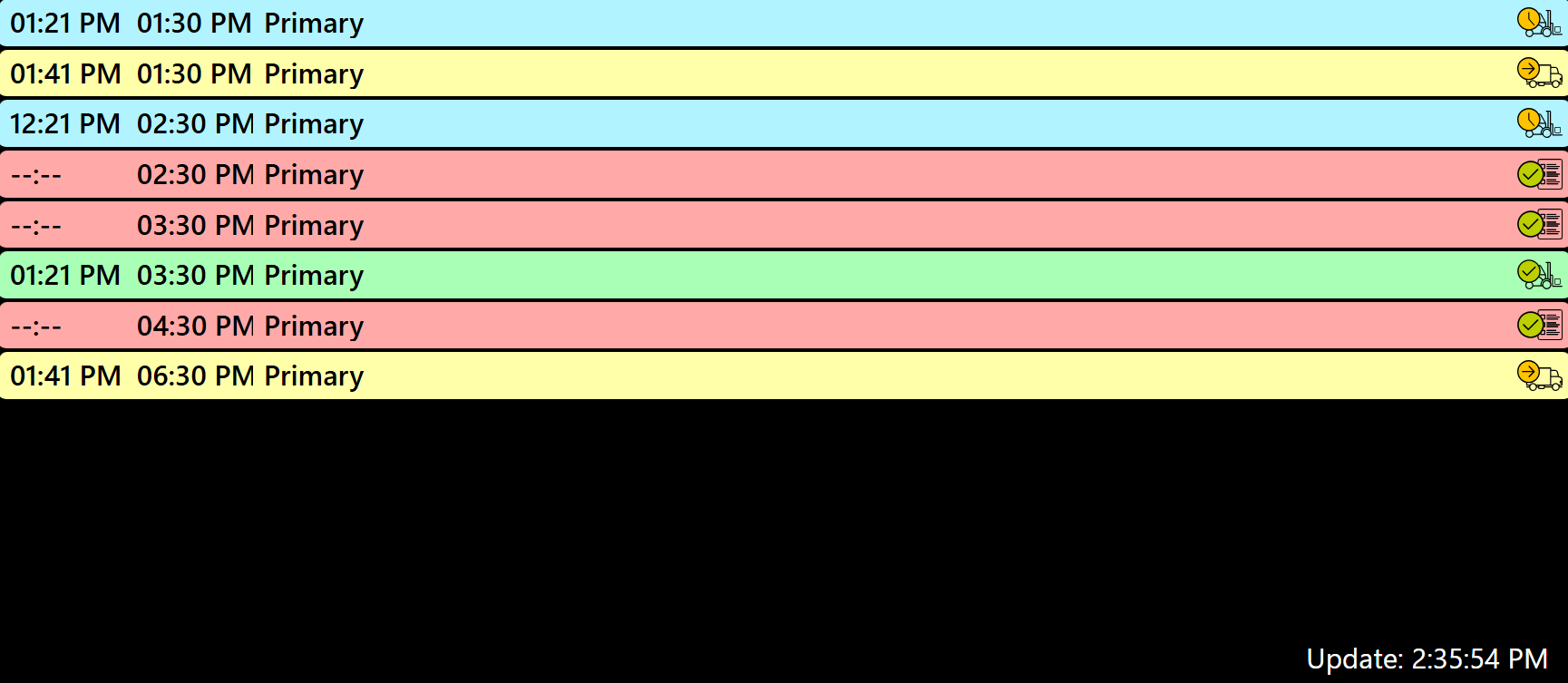
- Colour by reservation status:
- Approved → red
- Vehicle arrived on site → yellow
- Processing started → blue
- Processing completed → green
- Carrier did not arrive → grey
¶ Information on the displayed reservation
- Vehicle arrival time
- Planned start of the reservation
- Branch
- Company ERP ID (by requester)
- Order numbers listed in the shipments
¶ Monitor 8
¶ Filter
- Current day from 00:00 to 24:00
- Only approved reservations are shown until the status "Vehicle departed" is set
- Displays only one configured dock
¶ Display
- Dock displayed full screen
- Count of reservations awaiting approval
- Header shows the dock name and configured colour from Time Slot Control
- Colour by reservation status:
- Approved reservation → grey
- Processing started → yellow
- Carrier did not arrive → red
¶ Information on the displayed reservation
- Planned start and end of the reservation
- Custom field 2
- Carrier
- Sender for inbound / recipient for outbound
- Pallet count
¶ Monitor 9
¶ Filter
- Current day from 00:00 to 24:00
- Reservations are displayed until the status "Vehicle departed" is set
- Displays only one configured dock
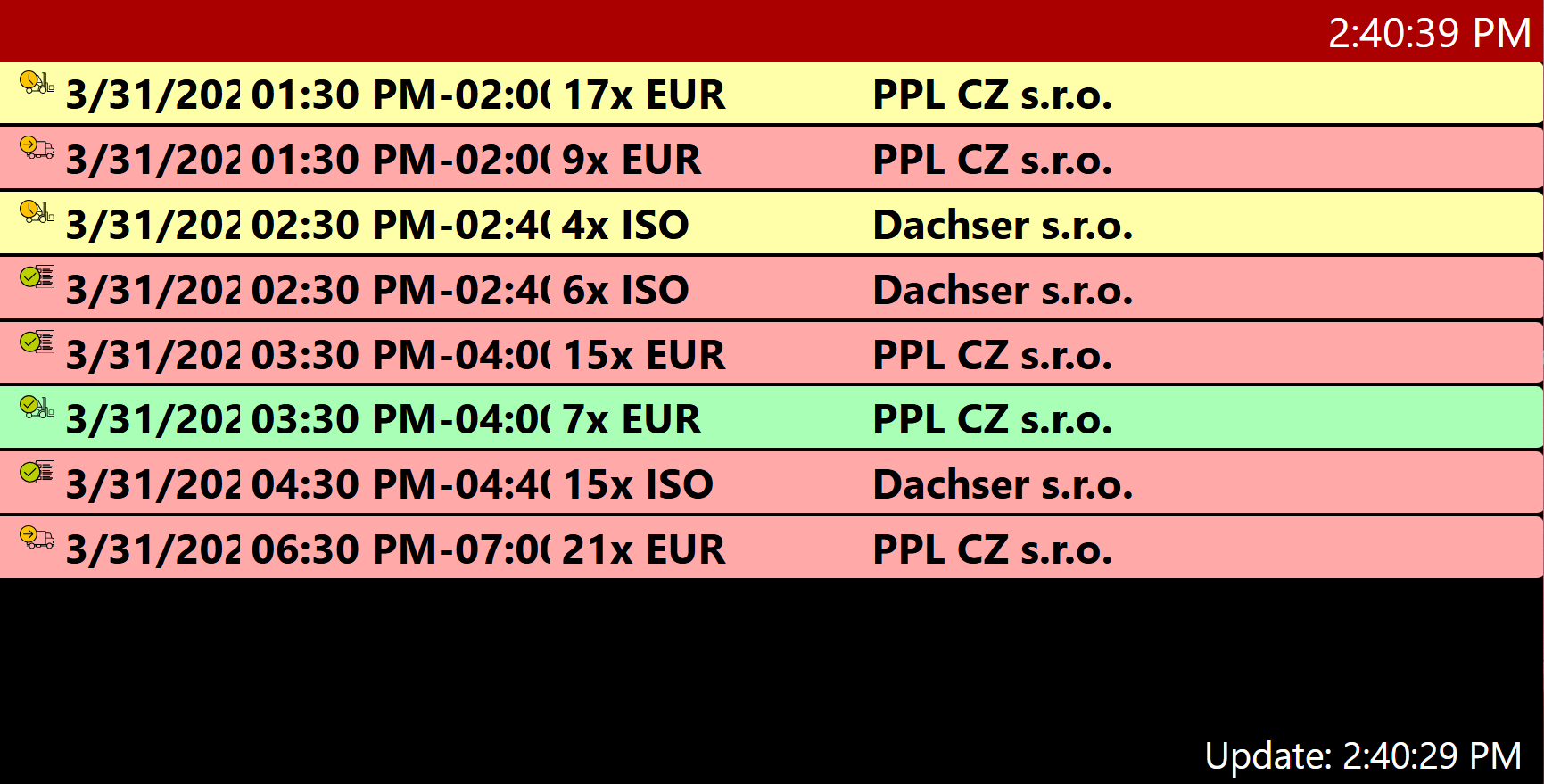
¶ Display
- Displayed as a single full-column list
- Count of reservations awaiting approval
- Header shows the dock name and configured colour from Time Slot Control
- Status icons shown on each reservation
- Colour by reservation status:
- Awaiting approval → grey
- Approved → red
- Processing started → yellow
- Processing completed → green
- Carrier did not arrive → red
¶ Information on the displayed reservation
- Status icon
- Date
- Planned start and end of the reservation
- Total duration of the reservation
- Total pallet count
- Carrier
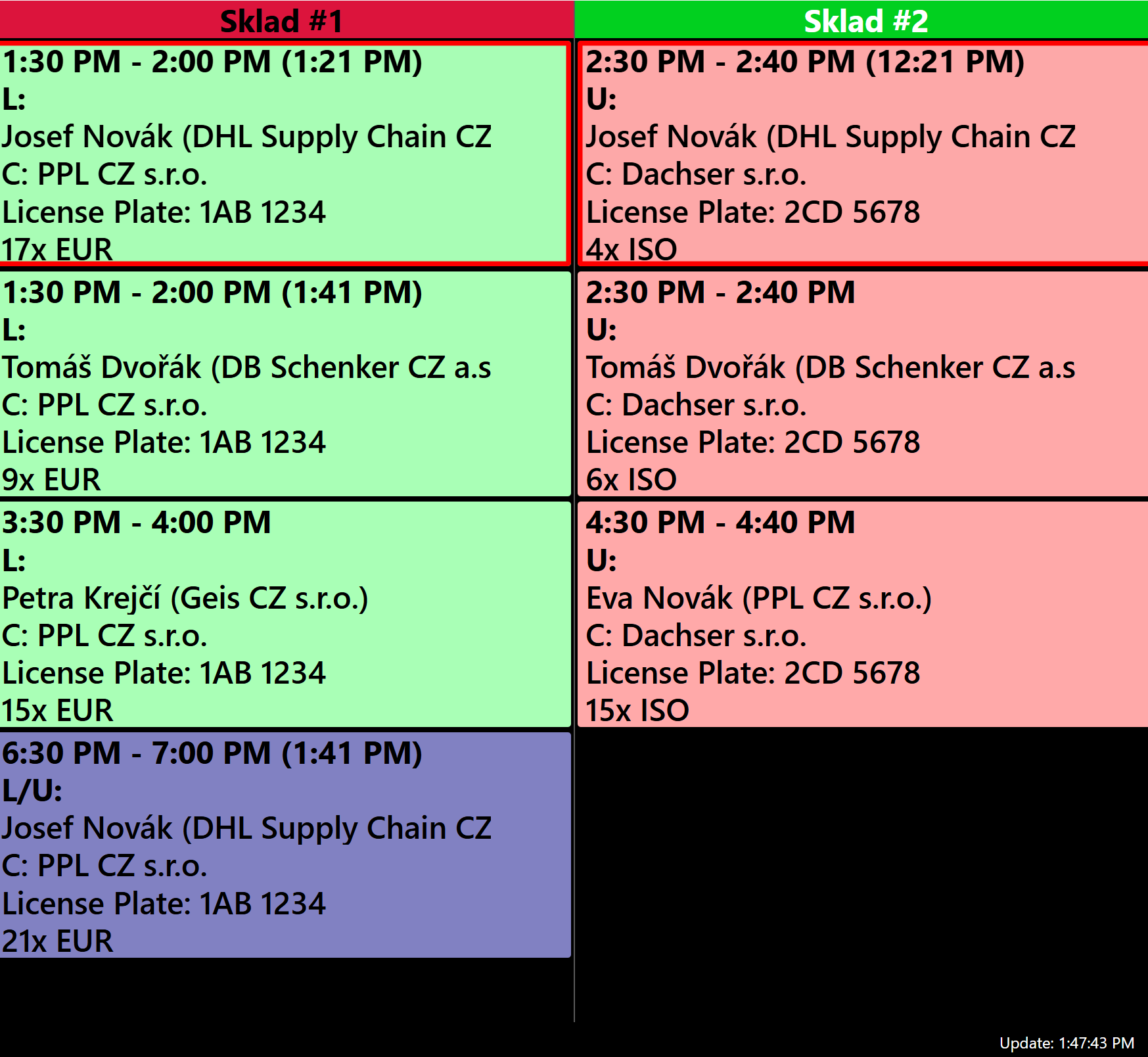
¶ Monitor 10
¶ Filter
- Current day from 00:00 to 24:00
- Only approved reservations are shown until the status "Vehicle departed" is set
- Can be configured to display individual docks (1-N)
¶ Display
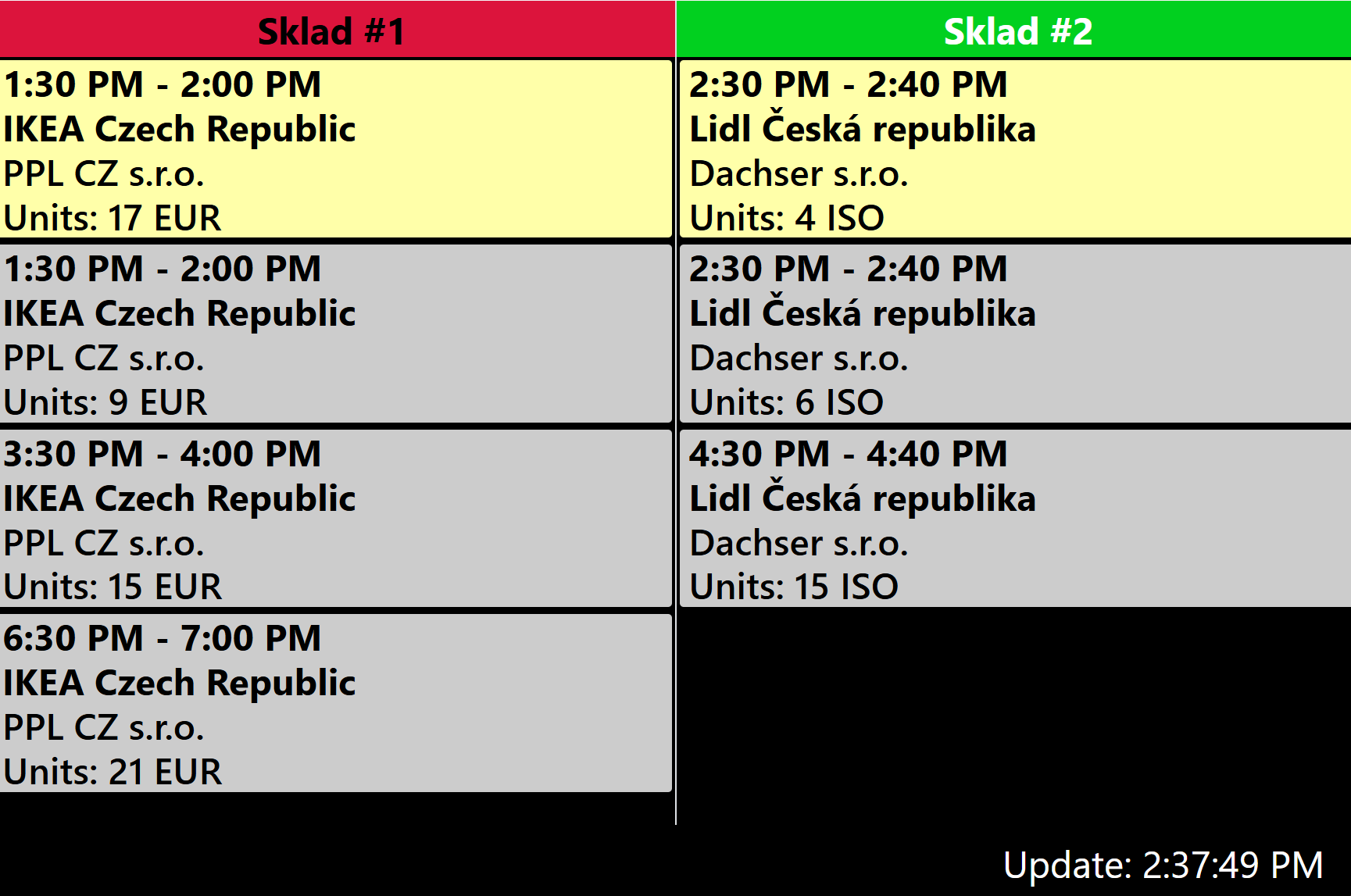
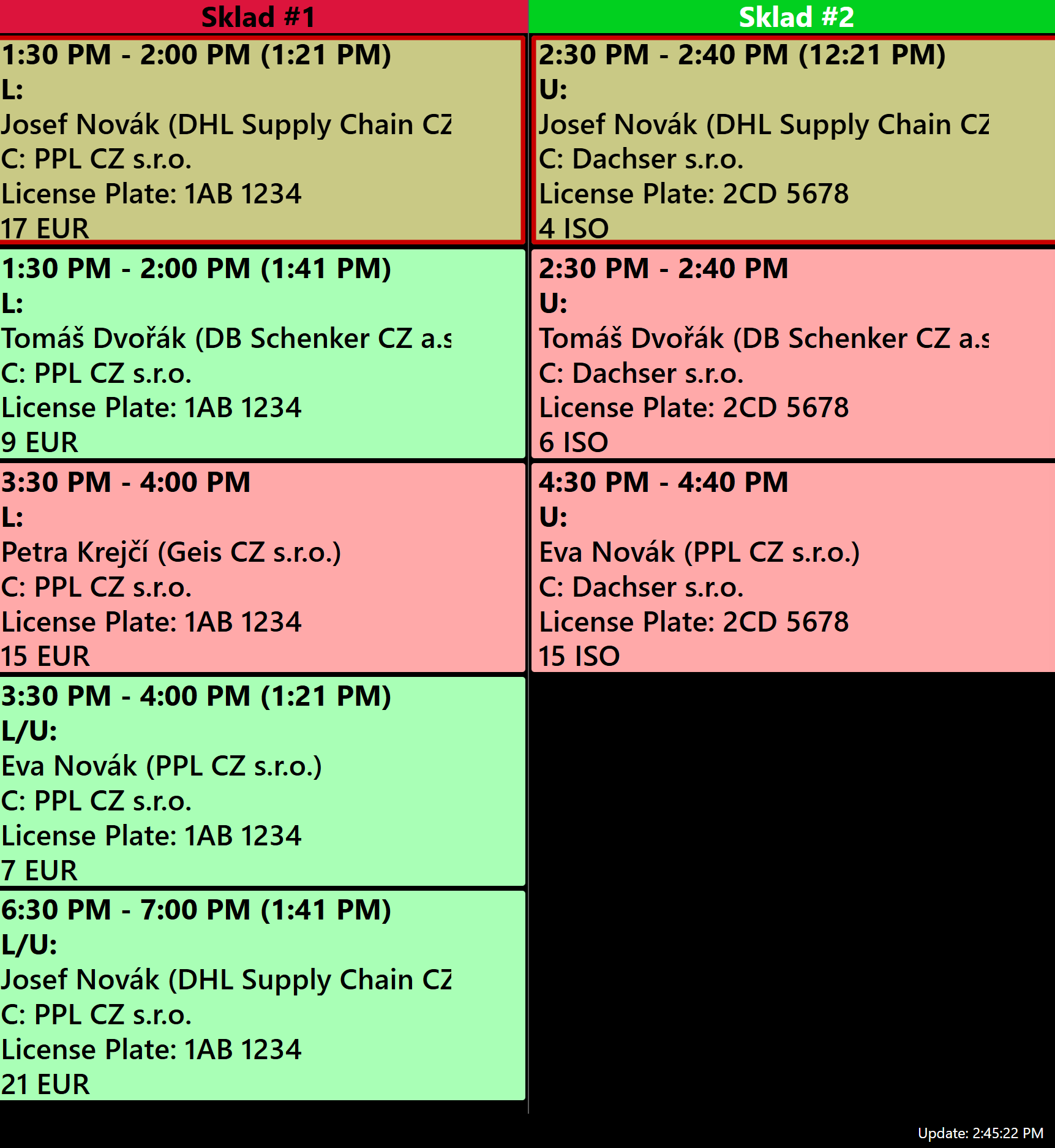
- Two-column layout - each column corresponds to one dock
- Column header shows the dock name and configured colour from Time Slot Control
- Colour by reservation status:
- Approved reservation → light yellow
- Vehicle arrived on site → yellow
- Both (loading + unloading) → purple
¶ Information on the displayed reservation
- Planned start and end of the reservation (+ vehicle arrival time in brackets)
- Action type (L / U / L/U)
- Name and company from the "Requester" field in the reservation
- Carrier
- LP
- Unit count
¶ Monitor 11
¶ Filter
- Current day from 00:00 to 24:00
- Only approved reservations are shown until the status "Vehicle departed" is set
- Can be configured to display individual docks (1-N)
¶ Display
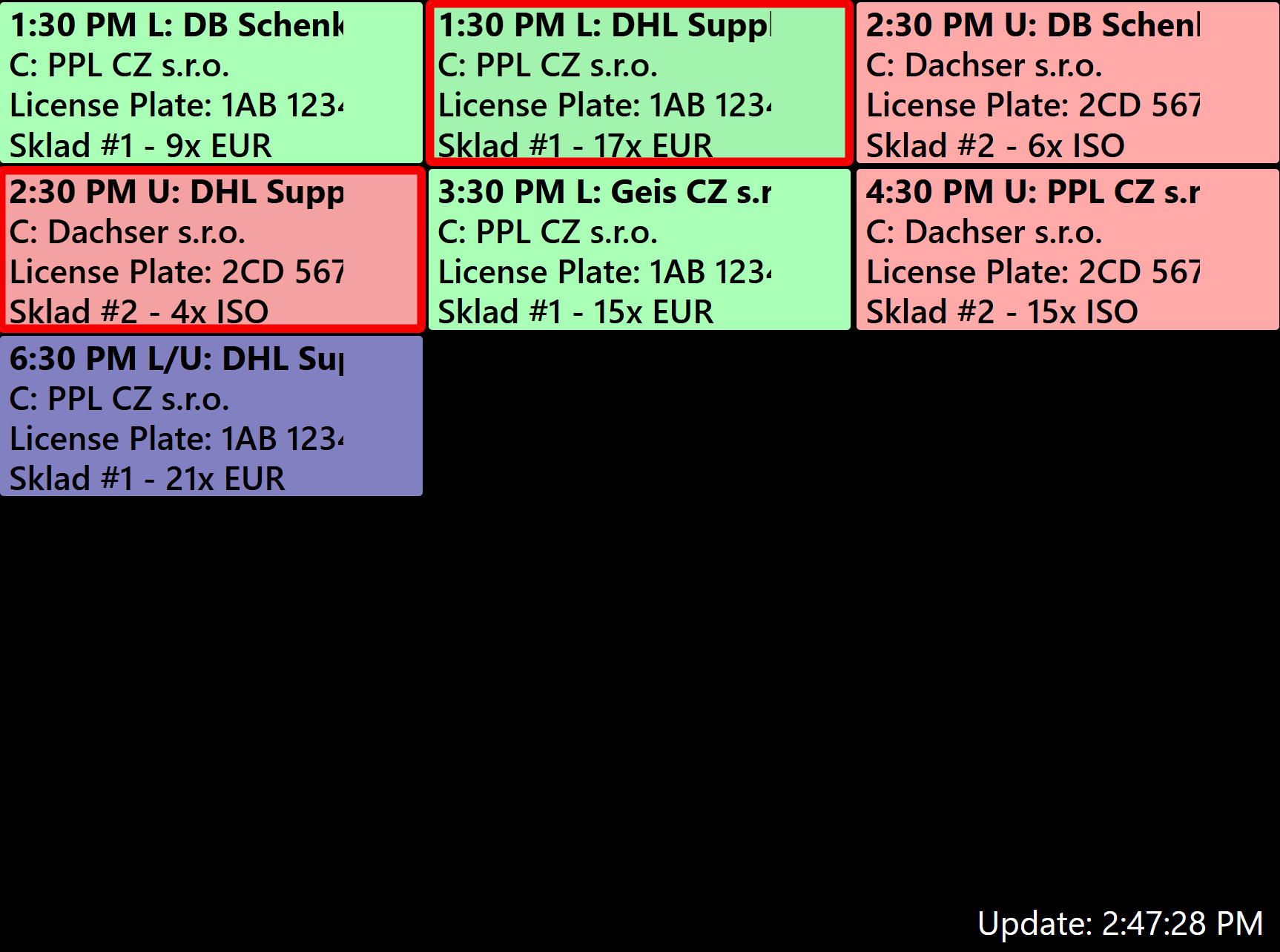
- 3 reservations per row
- Number of rows depends on monitor resolution (usually 3-4)
- Colour by action type:
- Loading → green
- Unloading → red
- Both → purple
- Carrier arrived without reservation → light yellow
- Reservations in status "Handling started" have red blinking borders
¶ Information on the displayed reservation
- Planned start of the reservation + action type : company from the "Requester" field
- Carrier
- LP
- Dock and total unit count across all lines
¶ Monitor 12
¶ Filter
- Current day from 00:00 to 24:00
- All reservations are displayed until the status "Vehicle departed" is set
- Can be configured to display individual docks (1-N)
¶ Display
- Displayed as a single full-column list
- Status icons shown on each reservation
- Colour by reservation status:
- Awaiting approval / Approved → light yellow
- Carrier on site (waiting) → yellow
- Vehicle arrived on site → light blue
- Processing started → orange
- Processing completed → green
- Approved (no arrival) → pink
¶ Information on the displayed reservation
- Vehicle arrival time
- Planned start of the reservation
- Branch
- Status icon