¶ Overview - Application Main View
Description of the main controls and sections of the Time Slot Control application's Main View.
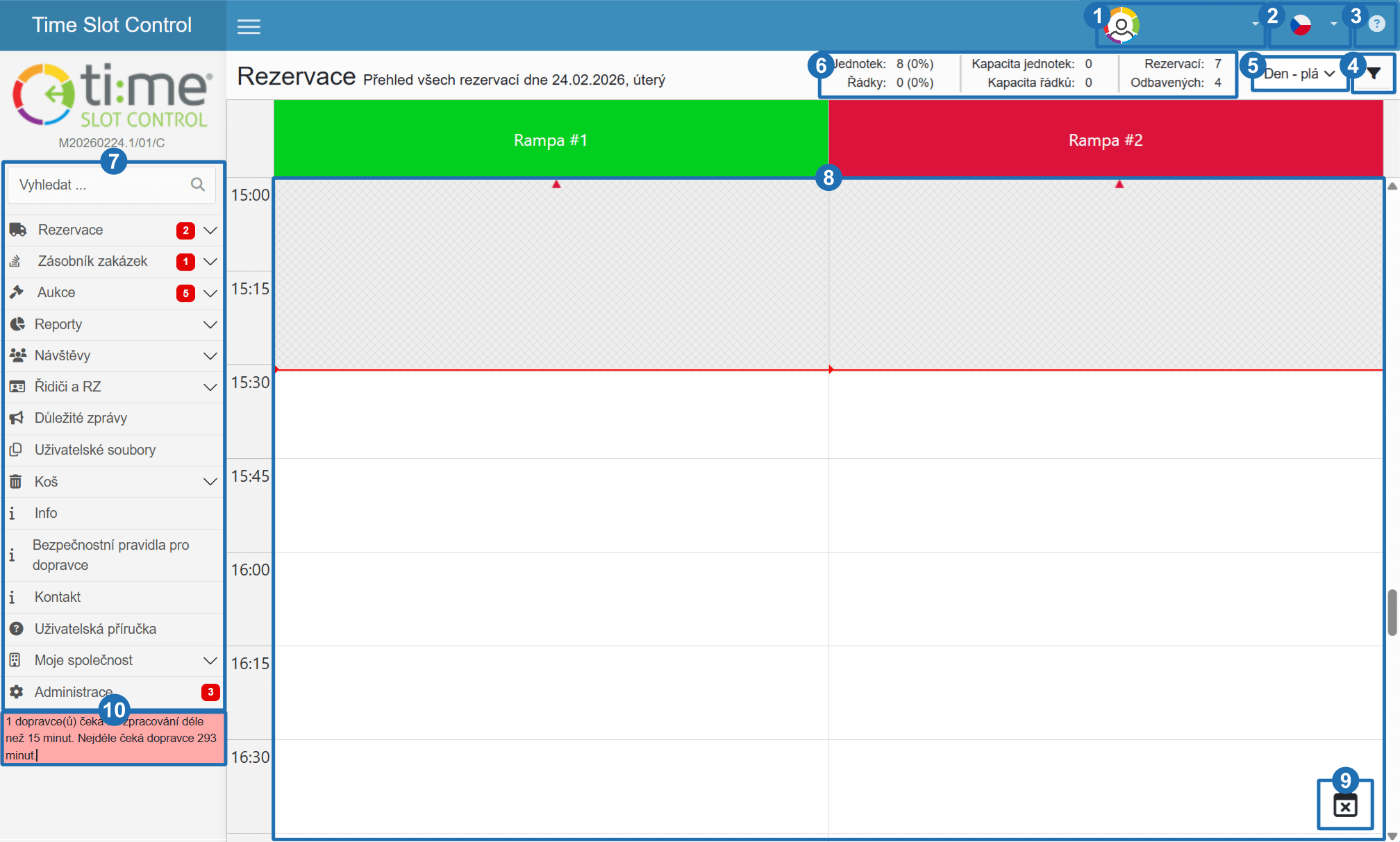
After logging in, the main reservation overview for the current day is displayed. It contains the dock calendar, the navigation bar and controls for managing reservations.
¶ How to read the calendar
The centre of the screen contains the dock calendar — the main working area of the application.
- Columns — individual docks (gates, bays) at the selected branch
- Rows — time axis divided into time slots
- Occupied cells — existing reservations with a status icon
- Empty cells — available slots
- Grey hatching — unavailable slots (outside opening hours or blocked by an exception)
Clicking an empty cell opens the reservation creation form with the date, time and dock pre-filled.
¶ Navigation bar
The left side of the screen contains the navigation bar with links to all parts of the system.
Branch selection — the system allows docks to be divided into multiple logical groups (e.g. different plants or warehouses). Selecting a branch switches the view to that branch's docks.
Date selection — use the left/right arrows or click the date to switch to a different day.
Overview — returns to the main calendar view for the current day
Table — list view of reservations for the selected day
New — opens a blank reservation form for the currently selected day
Search — search for reservations within a specified date range
Pending approval — list of all reservations awaiting approval, with bulk approve/reject actions
Export overview — export all reservations for the selected day to Excel
Legend — explanation of colours and icons displayed in the calendar
Reports — analytical tools for evaluating reservation data
Important messages — currently active internal announcements from the system operator
User files — documents shared by the operator (e.g. site rules, vehicle movement policy)
Contact — contact details for operator staff for cases when a time slot cannot be met or a reservation needs changing
Administration — access to all system configuration sections
¶ Legend of controls
-
User profile — access to account settings and logout → User Account Management
-
Language — switch the application language → Language Selection
-
Help — link to user documentation
-
Dock and date filter — change the displayed date, select the active branch
-
View switcher — switch between Day Plan, Day Actual, Gate Security, Long-term Overview → Types of view
-
Stats rotator — live operational statistics (reservation counts, vehicles on site, etc.)
-
User menu — navigation to other sections of the system
-
Dock calendar — the main working area for viewing and managing reservations
-
Working hours exceptions — manage schedule blocks and exceptions
-
Information panel — displays important operational notices