¶ System Settings - Forms
The Forms tab covers:
- Field visibility in the reservation form
- Workflow verification steps
- Delivery form, row form and actions dialog
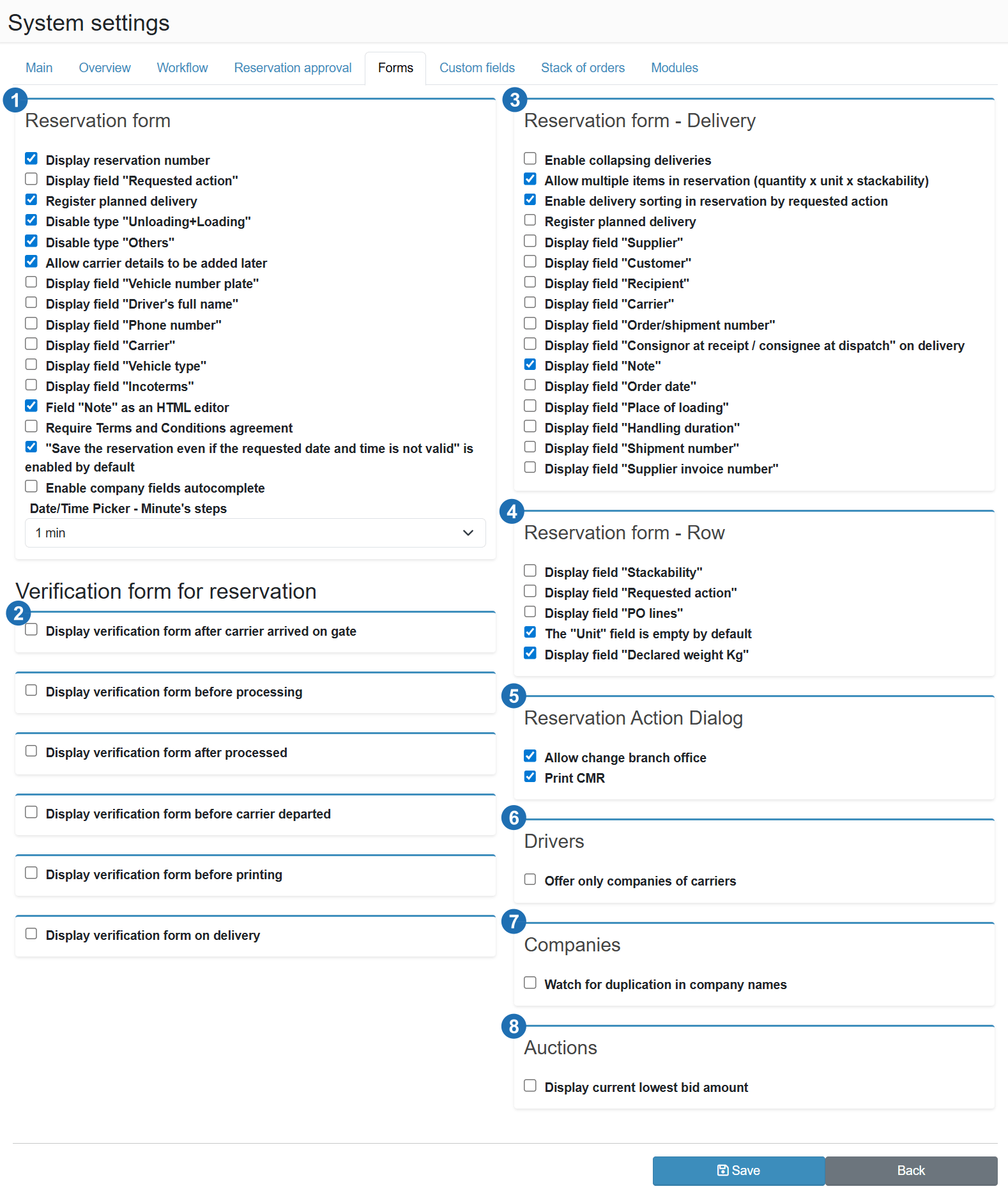
¶ Reservation form (1)
Show reservation number
Displays the generated reservation number in the form. Useful for operations where the number is used for carrier communication or for matching with external systems.
Show field "Requested action"
Adds a field for selecting the requested action (loading, unloading, etc.) to the form. If the operation distinguishes between action types, this field lets the carrier or dispatcher specify the purpose of the reservation.
Track planned delivery
Displays a field for entering the planned delivery date and time to the customer. Allows tracking whether goods were delivered within the planned timeframe.
Disable type "Unloading+Loading"
Removes the combined reservation type (unloading and loading in a single reservation) from the selection. Suitable for operations that do not use this type and want to prevent carriers from selecting it by mistake.
Disable type "Other"
Removes the "Other" reservation type from the selection for operations that work only with standard operation types.
Allow later completion of driver details
Allows saving a reservation without filling in the licence plate, driver name or phone number. The carrier can add these details later - suitable for reservations created in advance when the driver is not yet known.
Show field "Vehicle licence plate"
Adds a field for entering the vehicle registration number to the form. Used for identifying the vehicle at the gate and for matching arrivals with reservations.
Show field "Driver first and last name"
Adds a field for the driver's full name to the form. Used to identify the specific person upon arrival and for gate communication.
Show field "Driver phone number"
Adds a contact phone number field for the driver to the form. The number is used for sending SMS notifications (e.g. call to dock).
Show field "Carrier"
Adds a field for selecting or entering the carrier name to the form. Suitable for operations where the carrier differs from the entity that created the reservation.
Show field "Vehicle type"
Adds a vehicle type field (semi-trailer, flatbed, van, etc.) to the form. Allows dispatchers to plan dock occupancy based on the physical requirements of the vehicle.
Show field "Incoterms"
Adds a field for selecting the Incoterms delivery condition (EXW, DDP, FCA, etc.) to the form. Suitable for international shipments where the delivery term affects liability for the goods.
"Note" field as HTML editor
Replaces the simple text field for the note with a full HTML editor supporting formatting. Suitable for operations where structured instructions for dock staff are entered in the note field.
Require consent to terms and conditions
The carrier must tick a terms and conditions checkbox when creating or editing a reservation. The reservation cannot be saved without this confirmation.
"Save reservation even if the requested date and time is not valid" is enabled by default
Allows saving a reservation even if the chosen time conflicts with resource capacity or rules. This should only be the default in operations where a dispatcher manually reviews and reschedules reservations.
Enable autocomplete on company fields
When typing in the Carrier, Supplier or Receiver fields, the system suggests existing companies from the database. Speeds up data entry and reduces the risk of creating duplicate records.
Date / time picker - minute steps
Sets how many minutes the time selector advances with each step in the date and time field when creating or editing a reservation. A value of 1 min allows any time to be entered. A value of 5 min or 15 min restricts selection to the corresponding intervals — for example 8:00, 8:15, 8:30.
¶ Reservation control form (2)
For details on how the form works, how to configure each trigger and what the form looks like in practice, see the Reservation Verification Form guide .
Show reservation control form after vehicle arrival at the gate
After recording a vehicle arrival, a control form (checklist) is shown to the gate operator. Allows verifying and completing shipment information before assigning the vehicle to a dock.
Show reservation control form before handling starts
Displays the control form when staff begin loading or unloading. Suitable for verifying that the dock is ready and documentation is in order before work starts.
Show reservation control form when handling is completed
Displays the control form when handling is finished. Used for recording the actual quantity processed, confirming goods condition or signing the acceptance note.
Show reservation control form before vehicle departure
Displays the control form before recording vehicle departure. Allows a final check (closing documentation, releasing the dock) before the vehicle is cleared to leave.
Show reservation control form before printing
Displays the control form before printing reservation documents (CMR, delivery note). Ensures all required fields are filled in before the print job is generated.
Show reservation control form at delivery
Displays the control form when recording delivery of goods to the customer. Suitable for operations where delivery confirmation is recorded as a separate step.
¶ Reservation form - Delivery (3)
Allow collapsing deliveries
Lets the user collapse the delivery list in a reservation to a compact view. Improves form readability for reservations with a larger number of deliveries.
Allow multiple items in a reservation (quantity x unit x stackability)
Enables entering multiple delivery lines in a single reservation with quantity, unit and stackability values. Suitable for reservations covering several different goods types or pallet kinds.
Allow sorting deliveries in a reservation by requested action
Deliveries within a reservation can be sorted by their requested action type (loading, unloading). Simplifies navigation for reservations that combine multiple operation types.
Track planned delivery
Adds a planned delivery date and time field to the delivery. Allows tracking delivery deadlines at the individual delivery level within a single reservation.
Show field "Supplier"
Adds a supplier field to the delivery. Suitable for operations where a single reservation may involve goods from multiple different suppliers.
Show field "Orderer"
Adds an orderer field to the delivery for entering who placed the transport order. Used to distinguish the ordering party when the orderer and the carrier are not the same entity.
Show field "Receiver"
Adds a receiver field to the delivery for recording the consignee. Used to track the final customer or warehouse to which the shipment is destined.
Show field "Carrier"
Adds a carrier field at the delivery level. Used when different deliveries within a single reservation are transported by different carriers.
Show field "Order/shipment number"
Adds a field for the order or shipment number to the delivery. Enables matching the delivery with external documents (ERP purchase order, transport instruction).
Show field "Sender at inbound / receiver at outbound" on delivery
Adds a context-sensitive field that appears as "Sender" on inbound deliveries and as "Receiver" on outbound ones. Simplifies entering the counterparty without having to distinguish the operation type manually.
Show field "Note"
Adds a text note field to the delivery. Allows recording specific instructions or information for a given delivery independently of the reservation-level note.
Show field "Order date"
Adds an order date field to the delivery. Useful for tracking when the shipment was ordered and for matching with internal documents.
Show field "Loading location"
Adds a loading location field to the delivery. Used for shipments where the loading point differs from the company's address.
Show field "Processing time"
Adds a planned processing time field (loading or unloading duration) to the delivery. Used for capacity planning and measuring deviations from actual handling time.
Show field "Shipment number"
Adds a shipment number field (tracking number, AWB, etc.) to the delivery. Allows tracking the shipment or linking it to an external Track & Trace system.
Show field "Supplier invoice number"
Adds a supplier invoice number field to the delivery. Used to link the shipment to billing documents and to support claims processing.
¶ Reservation form - Row (4)
Show field "Stackability"
Adds a stackability field to the delivery row (number of layers that can be stacked on top of each other). Suitable for operations with strict warehouse stacking rules or when handling fragile goods.
Show field "Requested action"
Adds a requested action field at the row level. Used for mixed deliveries where different rows require different handling.
Show field "PO lines"
Adds a purchase order line number field (PO line). Allows matching physically delivered goods to specific order lines in the ERP system.
"Unit" field is empty by default
The unit type field (pallet, box, kg, etc.) will not be pre-filled when a new row is created - the user must select the unit manually. Prevents incorrect reservations where the default unit is unsuitable for the given case.
Show field "Declared weight (Kg)"
Adds a declared shipment weight field in kilograms to the row. Suitable for operations with weighing equipment or for comparing declared weight against the weight measured on arrival.
¶ Reservation actions dialog (5)
Allow branch change
Adds an option to the actions dialog for moving a reservation to a different branch. Allows operatively responding to situations where a shipment is redirected to another plant or warehouse.
Print CMR
Adds a button for printing the CMR consignment note to the actions dialog. Requires the CMR Print module to be enabled in the Main tab.
¶ Drivers and licence plates (6)
This section will only be displayed if the Drivers module is active. You can activate the module in System Settings → Main → Modules.
Suggest carrier companies only
When searching for a driver or licence plate, the system limits suggestions to records associated with companies of type "Carrier". Prevents selecting contacts from other categories (customers, suppliers).
¶ Companies (7)
Check for duplicate company names
The system warns or prevents saving a new company if a record with the same name already exists. Helps keep the carrier and customer database clean without duplicate entries.
¶ Auction (8)
This section will only be displayed if the Auctions module is active. You can activate the module in System Settings → Main → Modules.
Display the current lowest bid amount
Shows the currently lowest bid submitted by other participants in the auction form. Allows carriers to outbid competitors, but reduces process transparency - consider whether this information should remain hidden.