¶ System settings - Workflow
The Workflow tab covers:
- Arrival and departure registration
- End-user settings
- Cross-dock operations and reservation numbering
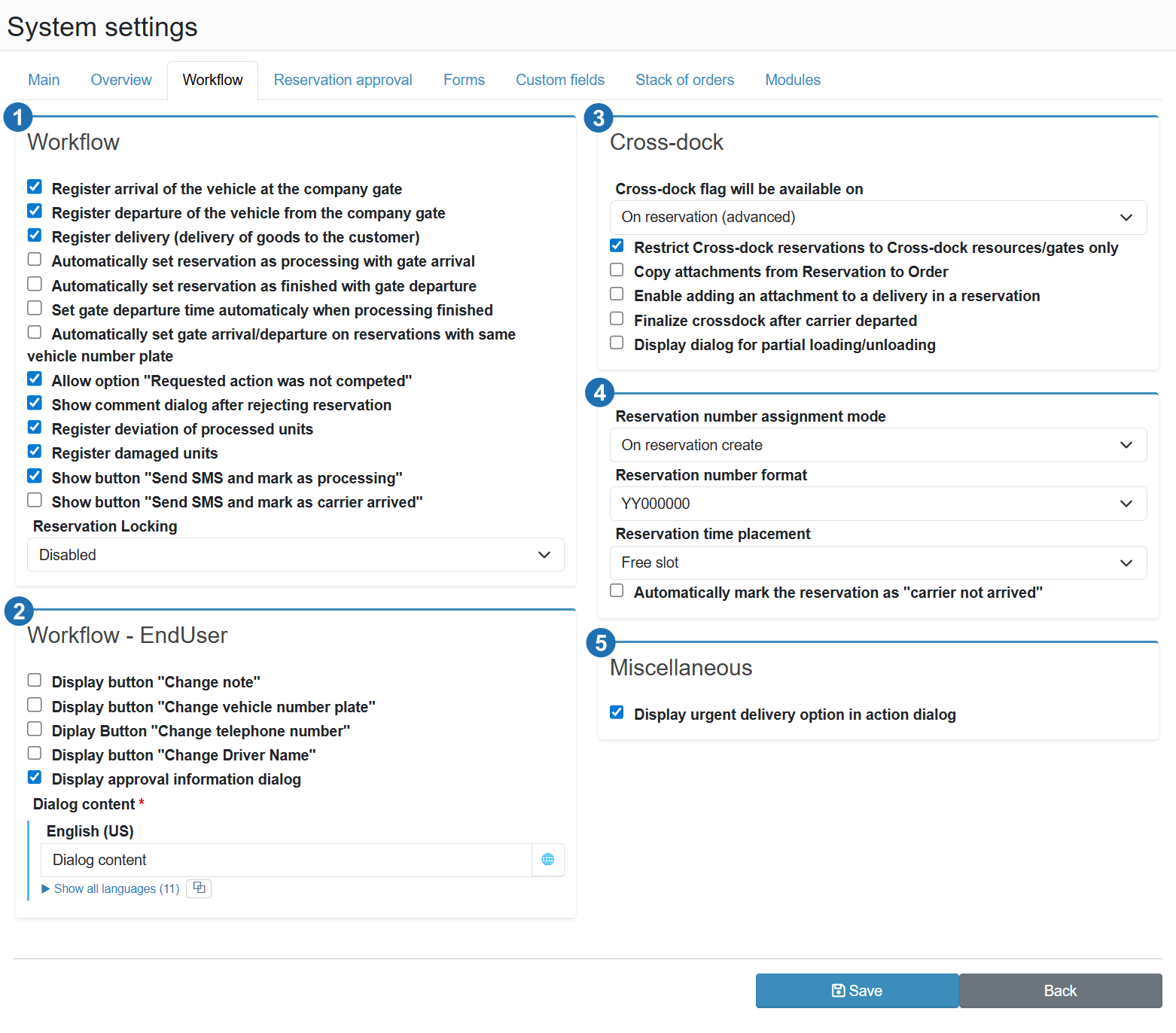
¶ Workflow (1)
Track vehicle arrival at the premises (at the gate)
Enables arrival tracking - staff can record in the overview that a vehicle has arrived at the gatehouse. Without this toggle, arrivals are not tracked in the system.
Track vehicle departure from the premises (at the gate)
Enables departure tracking - staff can record that a vehicle has left the site. Allows measuring the total time the vehicle spent on site.
Track delivery (delivery of goods to the customer)
Enables the delivery step in the reservation flow. Allows recording confirmation of goods handover to the customer as a separate workflow state.
Automatically set the start of handling when the vehicle arrives at the premises
When a vehicle arrival is recorded, the system automatically sets the handling start time (loading/unloading) to the current time. Removes the need to manually enter the start of handling.
Automatically set the end of handling when the vehicle departs from the premises
When a vehicle departure is recorded, the system automatically sets the handling end time. Prevents situations where staff forget to close handling manually.
Automatically fill in departure time when handling is completed
When handling is completed, the system automatically records the departure time as well. Suitable for operations where a vehicle leaves immediately after loading or unloading is finished.
Automatically set arrival/departure for other reservations with the same licence plate
If a single vehicle (licence plate) has multiple reservations on the same day, recording an arrival or departure is automatically applied to all reservations sharing the same plate. Saves staff time when vehicles have multiple stops.
Enable the option "Requested action was not carried out"
Adds an option in the action dialog to mark that a planned operation (loading, unloading) did not take place. Allows recording unexecuted actions without having to delete or cancel the reservation.
Show a dialog for entering the reason when a reservation is rejected
When rejecting a reservation, the system displays a form where staff can enter the reason for rejection. The reason is saved on the reservation and is visible to the carrier and in the change history.
Track deviation in processed units
Activates a field for entering the actual quantity processed compared to the planned amount. Allows tracking whether the correct number of units (pallets, boxes, etc.) was loaded or unloaded.
Track damaged units
Adds a field to the workflow for recording the number of damaged units during loading or unloading. Used for claims documentation and logistics discrepancy tracking.
Show button "Send SMS and mark as in progress"
Adds a button to the reservation actions that sends an SMS to the carrier and marks the reservation as in progress in a single click. Speeds up gatehouse operations.
Show button "Send SMS and mark carrier as arrived"
Adds a button to the reservation actions that sends an SMS and records the carrier's arrival in a single click. Suitable for operations where an SMS is sent as standard procedure on every arrival.
Reservation blocking
Determines whether the system locks a reservation being edited against simultaneous edits by another user. Inactive = multiple users can edit the same reservation at the same time. Read-only = once one user opens a reservation for editing, others see it as read-only and are informed who is currently editing it. Blocking the carrier after the gate process starts (vehicle arrival/departure) happens automatically regardless of this setting.
¶ Workflow - end user (2)
Show button "Change note"
Displays a button in the carrier portal for changing the reservation note. Allows the carrier to add or correct information without contacting the dispatcher.
Show button "Change licence plate"
Displays a button for changing the vehicle licence plate. Useful when the vehicle changes at the last minute and the carrier needs to update the plate themselves.
Show button "Change phone number"
Displays a button for updating the driver's contact phone number. Ensures the dispatcher always has the current number for SMS notifications or calls.
Show button "Change driver name"
Displays a button for changing the driver's name. Allows updating the reservation when the driver is replaced, without requiring administrator involvement.
Show information dialog about reservation approval
After the carrier creates a reservation, an information dialog is automatically displayed on the reservation overview page with the text configured in the Dialog content field. The dialog only appears for carriers whose company does not have automatic approval enabled — i.e. those whose reservations require manual approval. Suitable for communicating site entry conditions or other instructions to the carrier.
Dialog content
Text shown in the information dialog after the carrier creates a reservation. Supports multilingual input - click the globe icon to add a translation for each language enabled in the system.
¶ Cross-dock (3)
Cross-dock flag will be available on
Determines where in the system the cross-dock option appears. On reservation (extended) allows marking a reservation as cross-dock directly in the reservation detail with extended configuration options.
Restrict cross-dock reservations to cross-dock resources/gates only
Cross-dock reservations can only be created on resources (docks) that are designated as cross-dock gates. Prevents cross-dock shipments from being incorrectly assigned to standard docks.
Copy attachments from reservation to order
Files attached to the inbound reservation are automatically copied to the linked outbound order. Ensures that documentation (CMR, delivery notes) is available on both sides of the cross-dock operation.
Allow adding an attachment to a delivery within a reservation
Allows uploading files directly to individual deliveries within a cross-dock reservation, not only to the reservation as a whole. Suitable for per-shipment documentation.
Finalise cross-dock when carrier departure is recorded
Once the departure of the carrier on the outbound reservation is recorded, the cross-dock operation is automatically closed. Prevents unintended retrospective changes after the vehicle has physically left.
Show partial loading/unloading dialog
When processing a cross-dock operation, displays a dialog that allows recording that only part of the shipment was loaded or unloaded. Supports partial delivery scenarios.
¶ Reservations (4)
Reservation number assignment method
Determines when a sequential number is assigned to a reservation. On reservation creation = the number is assigned immediately when saved. Other options allow assigning the number only after approval or another action.
Reservation number format
Template used to generate reservation numbers. YY000000 = two-digit year + six-digit sequential number (e.g. 250001). The format can be customised to match internal numbering requirements.
Reservation time selection
Determines how a carrier or dispatcher selects the reservation time. Free slot = the user can enter any time within the available capacity. Other options may restrict selection to predefined time slots only.
Automatically mark reservations as "carrier did not arrive"
After a configured time has elapsed past the planned reservation start, the system automatically marks the reservation as a no-show. Eliminates the need to manually monitor and close expired reservations.
¶ Miscellaneous (5)
Show urgent delivery option in the action dialog
Adds an option to the reservation action dialog for marking a shipment as urgent. Staff can flag priority processing without having to edit the full reservation.